

In this article
Se hai avuto problemi con il tuo AOKZOE A1 che si spegneva e non si caricava correttamente, allora questo aggiornamento del firmware è un must!
Preparazione dell’unità flash USB
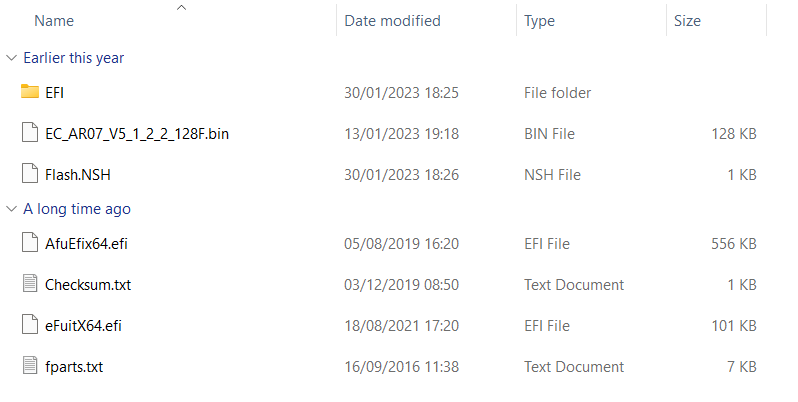
È possibile scaricare l’aggiornamento del firmware di AOKZOE A1 qui. Una volta scaricato, estrarre tutto il contenuto.
Formattare una chiavetta USB da 8 GB in formato FAT32 e chiamarla SHELL in lettere maiuscole.
Copiare tutti i file presenti nella cartella AOK-EC-100W nella directory principale della chiavetta USB.
Flashing di AOKZOE A1
Con l’AOKZOE A1 spento, inserire la chiavetta USB.
Accendere il dispositivo tenendo contemporaneamente premuti il tasto Home e il tasto Volume+. Si accede così all’interfaccia del BIOS.
Selezionare l’opzione che legge il nome della chiavetta USB (ad esempio, “UEFI: Generic Flash Disk 8.07, Partition 1”) e confermare per avviare automaticamente il processo di scrittura.
La CE si aggiornerà automaticamente. Dopo circa 30 secondi, il sistema visualizzerà un messaggio con la scritta “Update EC ROM successfully!”.
A questo punto, premere il pulsante di accensione per spegnere il dispositivo.
Rimuovendo la chiavetta USB, è possibile accendere il dispositivo e utilizzarlo.
[azp_custom_product id=”17″]


Bringer of videos, text and images! AKA the social media guy at DROIX. Massive retro gaming fan and collector, with a far too large collection of consoles and computers from 1970's to modern. Contact me at [email protected]
Questions & comments
0
Every question gets an answer. Ask before you buy — DaveC and the team reply within one working day, and answers stay public so they help the next reader too.


