

In this article
Jei turėjote problemų dėl to, kad jūsų AOKZOE A1 išsijungia ir netinkamai įkrauna, šį programinės įrangos atnaujinimą būtina turėti!
USB atmintinės paruošimas
AOKZOE A1 programinės įrangos atnaujinimą galite atsisiųsti čia. Atsisiuntę išskleiskite visą turinį.
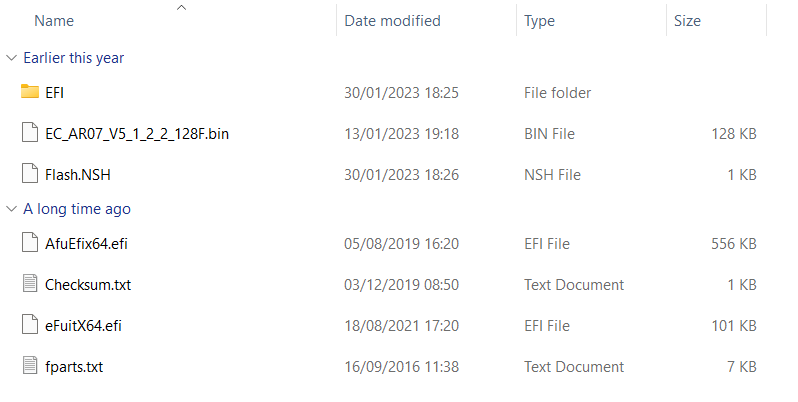
Suformatuokite 8 GB USB atmintinę FAT32 formatu ir pavadinkite ją SHELL didžiosiomis raidėmis.
Nukopijuokite visus AOK-EC-100W aplanke esančius failus į pagrindinį USB atmintinės katalogą.
AOKZOE A1 perjungimas
Kai AOKZOE A1 yra išjungtas, įdėkite USB atmintinę.
Įjunkite prietaisą vienu metu paspausdami ir laikydami nuspaustą klavišą ” Home” ir klavišą ” Volume+”. Taip pereisite į BIOS sąsają.
Pasirinkite parinktį, kuri nuskaito USB atmintinės pavadinimą (pvz., “UEFI: Generic Flash Disk 8.07, Partition 1”), ir patvirtinkite, kad įrašymo procesas prasidėtų automatiškai.
EK bus atnaujinta automatiškai. Maždaug po 30 sekundžių sistema parodys pranešimą “Atnaujinti EC ROM sėkmingai!”.
Šiuo metu paspauskite įjungimo mygtuką, kad išjungtumėte prietaisą.
Išimkite USB atmintinę ir galite įjungti prietaisą bei juo naudotis.
[azp_custom_product id=”17″]


Bringer of videos, text and images! AKA the social media guy at DROIX. Massive retro gaming fan and collector, with a far too large collection of consoles and computers from 1970's to modern. Contact me at [email protected]
Questions & comments
0
Every question gets an answer. Ask before you buy — DaveC and the team reply within one working day, and answers stay public so they help the next reader too.


