




في هذه المقالة
If you have been having some issues with your AOKZOE A1 shutting down and not properly charging then this firmware update is a must have!
Preparing the USB Flash Drive
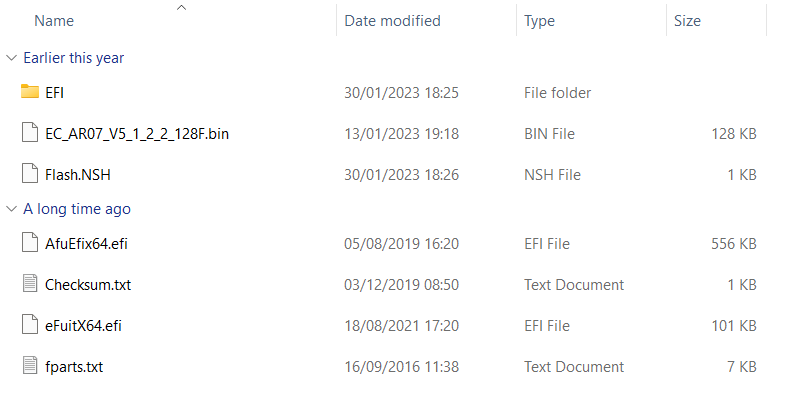
You can download the AOKZOE A1 firmware update here. Once downloaded, extract all the contents.
Format a 8GB USB flash drive in FAT32 format, and name it SHELL in capital letters.
Copy all the files located in the AOK-EC-100W folder to the root directory of the USB flash drive.
Flashing the AOKZOE A1
With the AOKZOE A1 powered off, insert the USB flash drive.
Turn on the device while simultaneously pressing and holding the Home key and the Volume+ key. This will take you to the BIOS interface.
Select the option that reads the USB flash drive’s name (for example, “UEFI: Generic Flash Disk 8.07, Partition 1”) and confirm to start the writing process automatically.
The EC will update automatically. After about 30 seconds, the system will display a message stating “Update EC ROM successfully!”
At this point, press the power button to shutdown the device.
Remove the USB flash drive and you can switch on your device and use it.
[azp_custom_product id=”17″]

Bringer of videos, text and images! AKA the social media guy at DROIX. Massive retro gaming fan and collector, with a far too large collection of consoles and computers from 1970's to modern. Contact me at [email protected]
الأسئلة والتعليقات
1
تحصل كل سؤال على إجابة. اسأل قبل الشراء — DaveC والفريق يرد في غضون يوم عمل واحد، والإجابات تبقى عامة لمساعدة القارئ التالي.
Hola ayuda. me pasa que, no carga apagada. Hice los pasos tal cual pero tampoco funcionó... Me podrías ayudar