




In this article
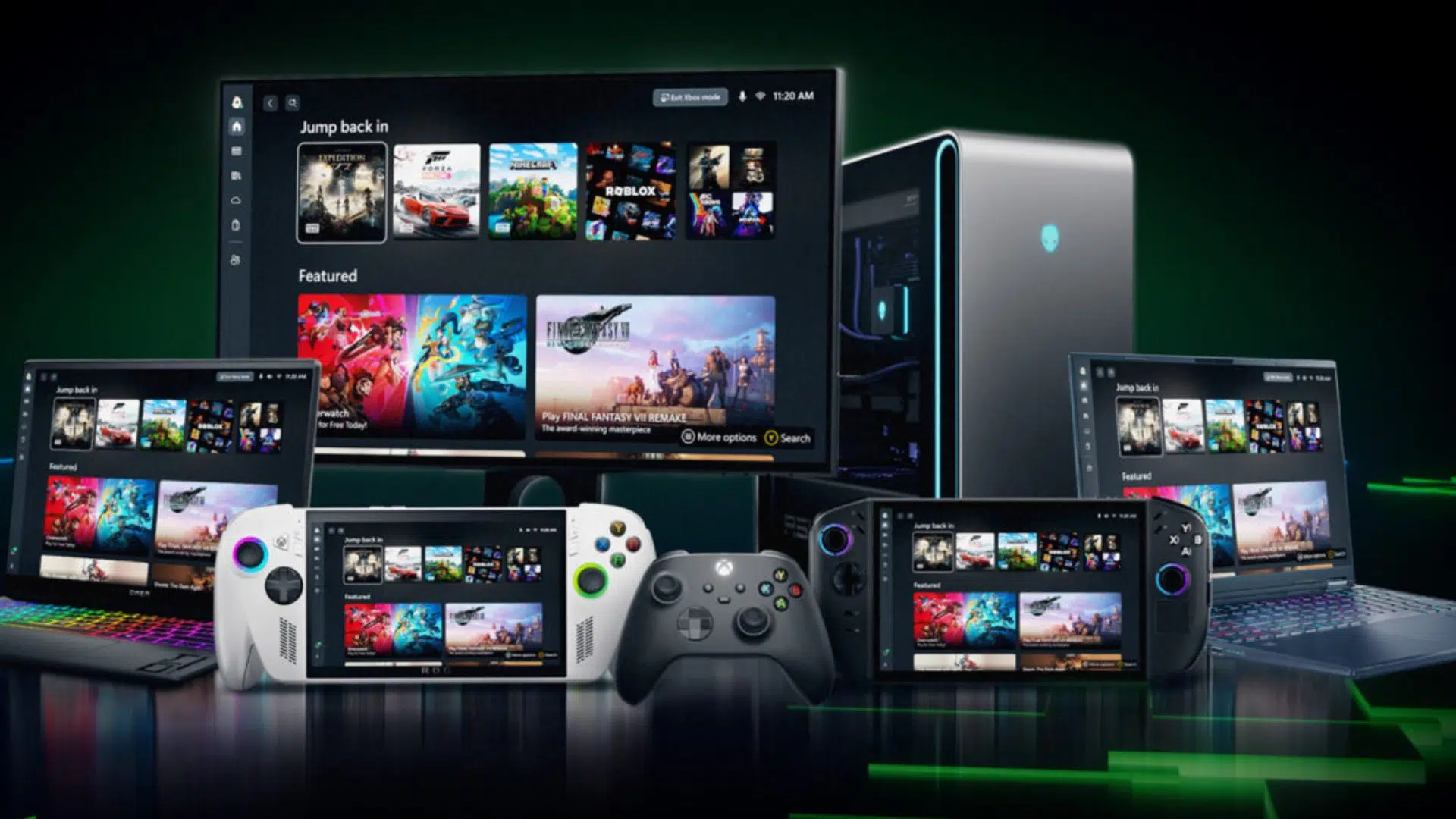
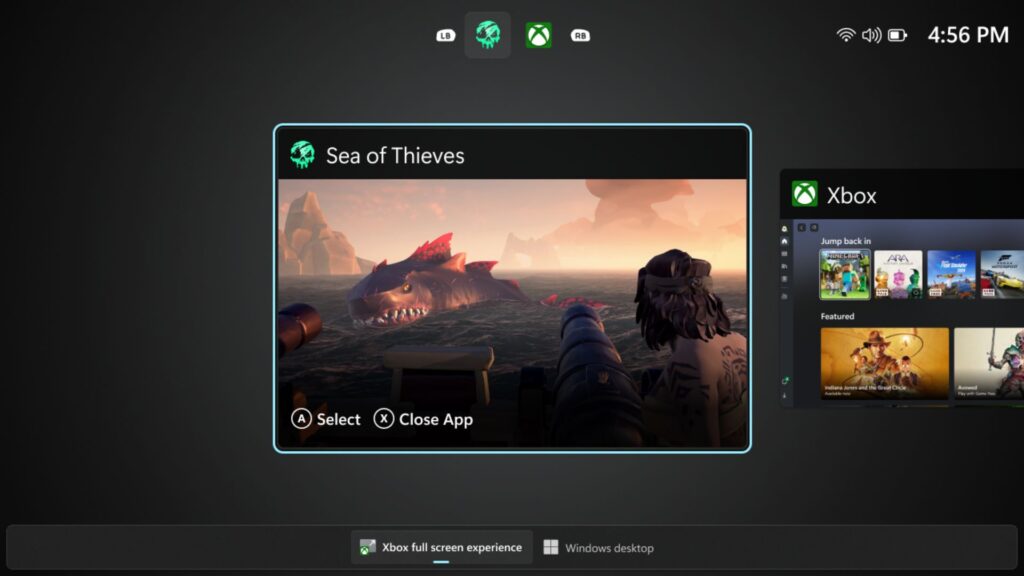
What is Xbox mode on Windows 11? Xbox mode is a new controller-optimised, full-screen gaming interface rolling out to Windows 11 PCs. It brings together Xbox Game Pass and installed games from major PC storefronts, reduces desktop clutter, and aims to make a handheld gaming computer or portable gaming PC feel more console-like.
Microsoft’s new Xbox mode announcement matters because it goes after one of the oldest complaints about Windows handhelds.
Raw performance has improved dramatically across the category, but the software experience still often feels like a desktop OS squeezed into a controller-first form factor. That can be fine on a gaming laptop, but it is less elegant on a portable gaming PC you want to wake, browse, launch, suspend, and resume like a console.
That is why Xbox mode is worth watching. According to Microsoft, the feature has started rolling out in select markets to Windows 11 PCs, including laptops, desktops, and tablets. Microsoft explicitly says the experience is designed for moments when games should take centre stage on Windows PCs and handhelds.
For owners, or would-be buyers, of handheld gaming PCs, that is the real hook.
Why Xbox mode matters more on handhelds than on desktops
A desktop player already has room for workarounds. A mouse is nearby, a keyboard is nearby, and the friction of Windows is easier to absorb when you are sitting at a desk. A handheld gaming PC is different.
On a handheld gaming computer, every bit of interface friction feels larger. Logging in, opening launchers, finding the right game, navigating pop-ups, or bouncing between storefronts all feel more annoying when you are holding a compact gaming PC in both hands instead of sitting in front of a monitor.
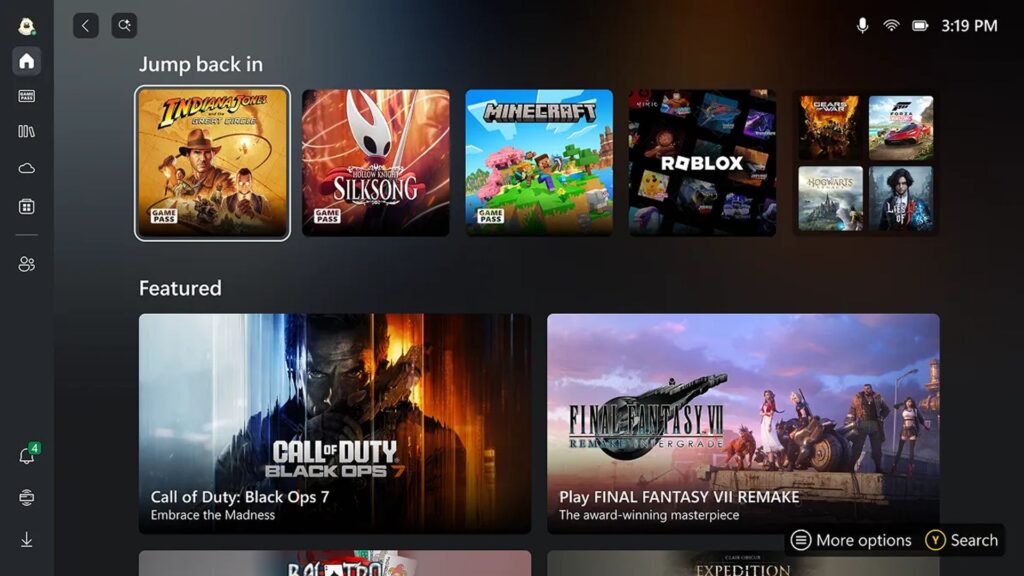
That is exactly the problem Xbox mode is trying to reduce. Microsoft says Xbox mode offers:
- a controller-optimised interface
- a full-screen gaming view
- quick access to your library and recently played games
- an aggregated library including Xbox Game Pass and installed games from leading PC storefronts
- the ability to jump back to the Windows 11 desktop when you want to
For mobile gaming PC owners it could be one of the more meaningful quality-of-life changes Windows has seen in a while.
This is a Windows handheld story, not just an Xbox app story
The most important framing here is that Xbox mode is not being pitched as a single launcher skin. Microsoft is positioning it as a broader way to play on Windows 11 PCs.
That matters because the premium end of the Windows handheld market keeps moving upward in power and price. Devices such as the GPD WIN 5, ONEXPLAYER ONEXFLY APEX, and AYANEO 3 are no longer niche curiosities. They are serious portable gaming computers designed to handle modern PC libraries in a truly mobile form factor.
The hardware side of the equation is already strong. What these devices still need, at times, is a more coherent front-end experience that makes Windows feel less like a compromise.
That is why this announcement lands well beyond Microsoft’s own ecosystem. Even if Xbox mode was not announced around GPD, ONEXPLAYER, or AYANEO specifically, the feature direction is directly relevant to the sort of customers shopping for a premium portable gaming PC from DROIX.
Popular right now
What people are buying this month
Prices as listed on each store

GPD WIN 5 (AI Max HX 385 – 32GB_RAM/1TB_NVME) (Raven Black)



 on 4 stores

MANGMI Pocket Max (Snapdragon 865 – 8GB_RAM/128GB_STORAGE) (Retro GB)
 on 14 stores

What Xbox mode could improve for GPD, ONEXPLAYER, and AYANEO owners
It is too early to claim that Xbox mode solves every Windows handheld headache. Microsoft has not said that, and we should not pretend otherwise. But the potential benefits are easy to understand.
| Confirmed Xbox mode direction | Why it could matter on Windows handhelds |
|---|---|
| Controller-optimised full-screen interface | Better fit for thumbstick and button navigation on a handheld gaming computer |
| Aggregated game library | Less hopping between separate storefronts and launchers on a compact gaming PC |
| Recently played games front and centre | Faster resume into your main library when using a mobile gaming PC casually |
| Option to return to the desktop | Keeps Windows flexibility without forcing desktop mode all the time |
| Gradual rollout across Windows 11 PCs | Suggests Microsoft sees this as a broader platform feature, not a one-device experiment |
For the GPD WIN 5, this matters because the device sits at the high end of the category and is built for people who want proper PC gaming power in a handheld shell. A more controller-led interface makes that kind of premium hardware easier to enjoy day to day, not just admire on a spec sheet.
For the ONEXPLAYER ONEXFLY APEX, the story is similar. Powerful silicon is only part of the experience. If Xbox mode helps reduce launch friction across a mixed library, it makes a premium mobile gaming PC feel more useable in short sessions, travel sessions, and sofa sessions.
For the AYANEO 3, the appeal is that modular, enthusiast-focused hardware works best when the software layer gets out of the way. A cleaner controller-first path into games would be a natural fit for a device sold on flexibility and handheld-focused design.
The bigger issue is Windows handheld identity
The category has been stuck between two identities for a while. On one side, these systems are absolutely PCs. That openness is one of their biggest strengths. You can run multiple storefronts, tweak settings, install utilities, and use them like a miniature computer when needed.
On the other side, many buyers are not shopping for a tiny laptop. They are shopping for a portable gaming PC that behaves more like a console when they are actually playing games. Xbox mode looks like Microsoft acknowledging that tension more openly.
If the rollout goes well, this could become one of the more important software shifts for Windows handhelds in 2026, not because it changes hardware performance, but because it changes how approachable that hardware feels in daily use.
That distinction matters. A handheld gaming computer does not only live or die on frame rates. It also lives or dies on how easy it is to pick up, browse, launch, suspend, and return to your games.
What Xbox mode does not prove yet
There are still some important limits here. First, rollout is gradual and market-limited at the start. That means some readers will have to wait.
Second, Microsoft is talking about a broader Windows 11 PC rollout, not promising identical tuning across every brand or every handheld model.
Third, a cleaner front end does not erase the wider complexity of PC gaming. Different launchers, anti-cheat issues, third-party account sign-ins, and Windows background behaviour can still create friction that a full-screen shell alone cannot fully remove.
Our verdict — Is Xbox mode on Windows 11 good news for handheld gaming PCs?
Short answer: Yes, because it targets a real usability problem in Windows handheld gaming, even if the rollout is still early.
Best for: Players who want a more console-like front end on a portable gaming PC without giving up Windows flexibility.
Not ideal for: Readers expecting a full fix for every launcher, login, or compatibility annoyance on day one.
Current status: Officially rolling out in select markets from 30 April 2026, with broader availability expected over the following weeks in those markets.
Rating: 8.6/10, based on the importance of the problem it addresses and the strength of the official platform direction as of May 2026.
FAQ
What is Xbox mode on Windows 11?
Xbox mode is a controller-optimised, full-screen gaming interface for Windows 11 PCs. It is designed to make game browsing and launching feel more console-like while keeping access to the wider flexibility of Windows.
Why does Xbox mode matter for a handheld gaming PC?
It matters because a handheld gaming PC is more sensitive to interface friction than a desktop. A controller-first layout, faster access to recently played games, and a cleaner library view can make daily use feel much smoother.
Is Xbox mode only relevant to ASUS handhelds?
No. The official announcement frames Xbox mode as a Windows 11 PC feature, not as a one-brand handheld feature. That makes it relevant to Windows handheld ecosystems from GPD, ONEXPLAYER, AYANEO, and other manufacturers.
Does Xbox mode replace the Windows desktop entirely?
No. Microsoft says users can move back and forth between Xbox mode and the Windows 11 desktop, so the goal is to add a better play-focused layer rather than remove traditional PC access.
Which handheld devices fit this best?
The cleanest product fits are current Windows handhelds such as the GPD WIN 5, ONEXPLAYER ONEXFLY APEX, and AYANEO 3, because they represent the kind of premium portable gaming computer hardware that benefits most from a stronger controller-first software layer.

Questions & comments
0
Every question gets an answer. Ask before you buy — DaveC and the team reply within one working day, and answers stay public so they help the next reader too.


