



Tässä artikkelissa
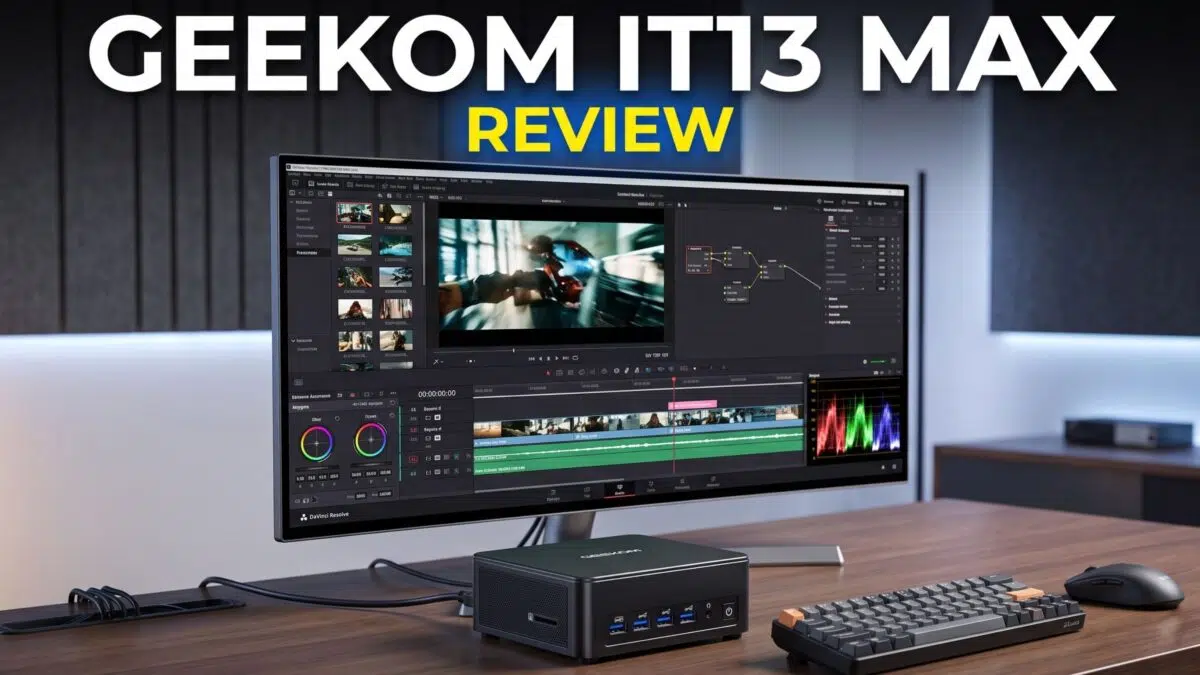
What is the GEEKOM IT13 Max? The GEEKOM IT13 Max is a 0.9-litre Windows mini PC built around Intel’s Core Ultra 9 185H processor and Intel Arc graphics. It combines dual USB4, dual 2.5GbE, four-display support, configurable memory and M.2 storage in a compact aluminium chassis.
This GEEKOM IT13 Max review examines whether that unusually broad connectivity, the 45W Core Ultra processor and the benchmark results add up to a compelling higher-end desktop replacement. It is aimed at buyers who need a compact system for demanding office work, creative tasks, media duties or lighter PC gaming, while keeping the limitations of Intel Arc graphics in view.
Testing conditions
- Device: GEEKOM IT13 Max
- Processor / graphics: Intel Core Ultra 9 185H / Intel Arc graphics
- Operating system: Windows 11 Pro
- Items tested: PCMark 10, PassMark, Cinebench R23, Cinebench 2026, 3DMark Time Spy, Night Raid, Fire Strike, Forza Horizon 5, Cyberpunk 2077 and Shadow of the Tomb Raider
GEEKOM IT13 Max Overview
The GEEKOM IT13 Max measures around 5.19 × 5.19 × 1.96 inches (132 × 132 × 50 mm) and weighs around 836g (1.84 lbs). Its black chassis uses an all-metal lower case and middle frame; GEEKOM states that this construction can withstand up to 200kg of pressure. This GEEKOM IT13 Max review found it to be a notably solid-feeling compact machine rather than a lightweight plastic box, which suits a desk, shelf or VESA-mounted installation.
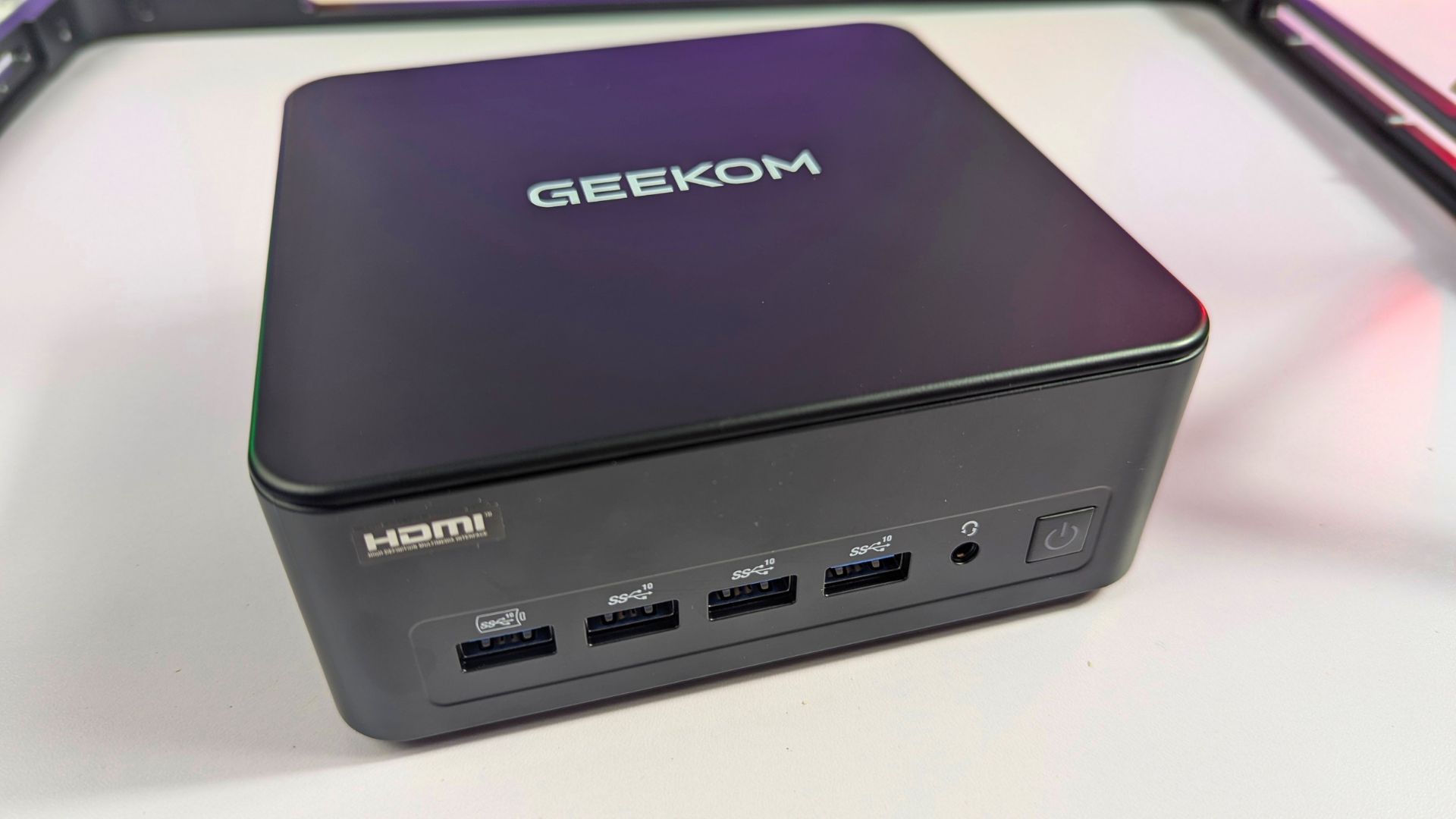
Across the front, there are four USB 3.2 Gen 2 Type-A ports, a 3.5mm headset jack and the power button. The first USB Type-A port is always on and can be used to charge a device, even when that convenience matters more than transferring data. Four front-facing Type-A ports are a practical advantage for users who regularly connect peripherals, removable storage or a wired controller.
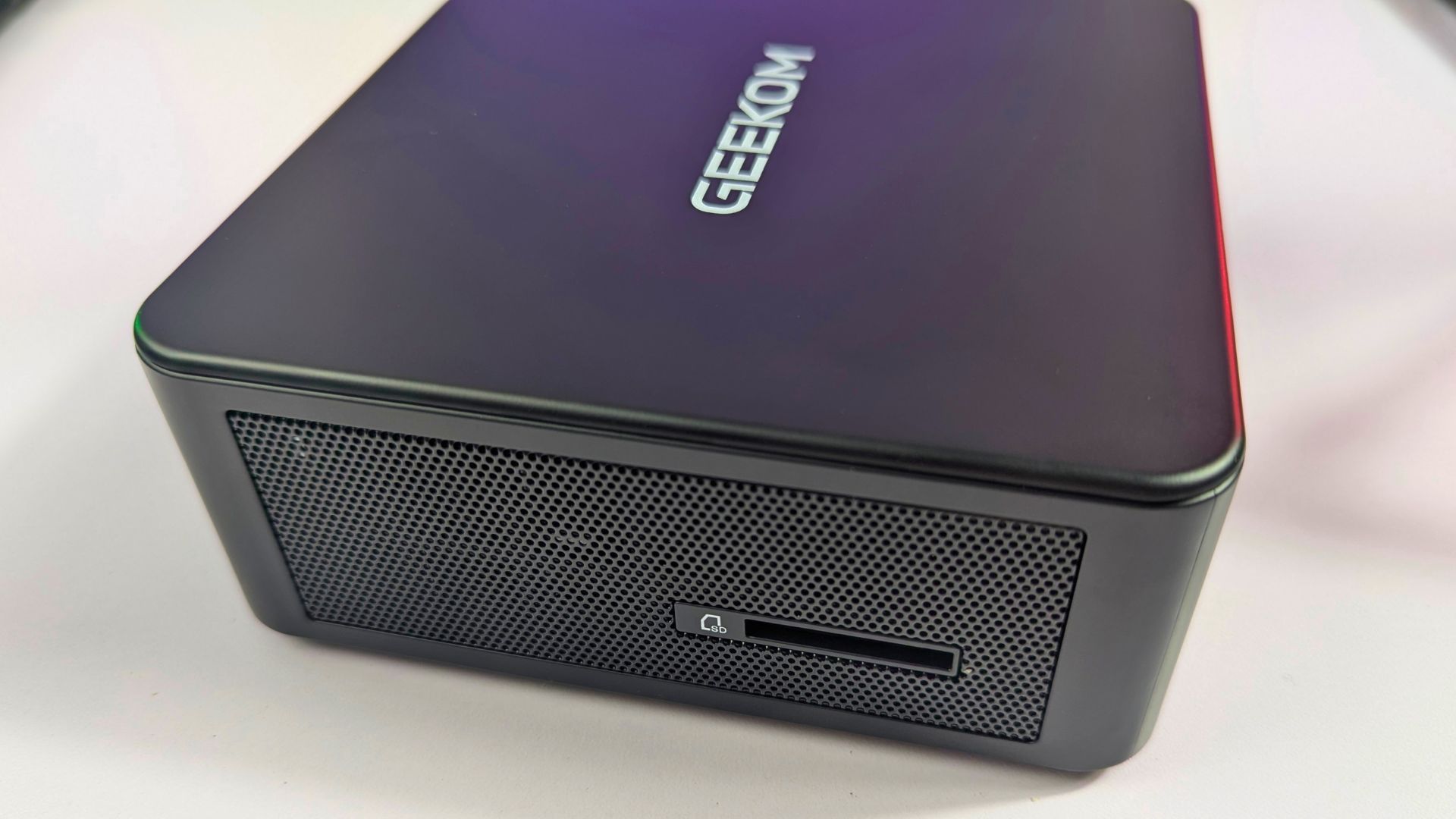
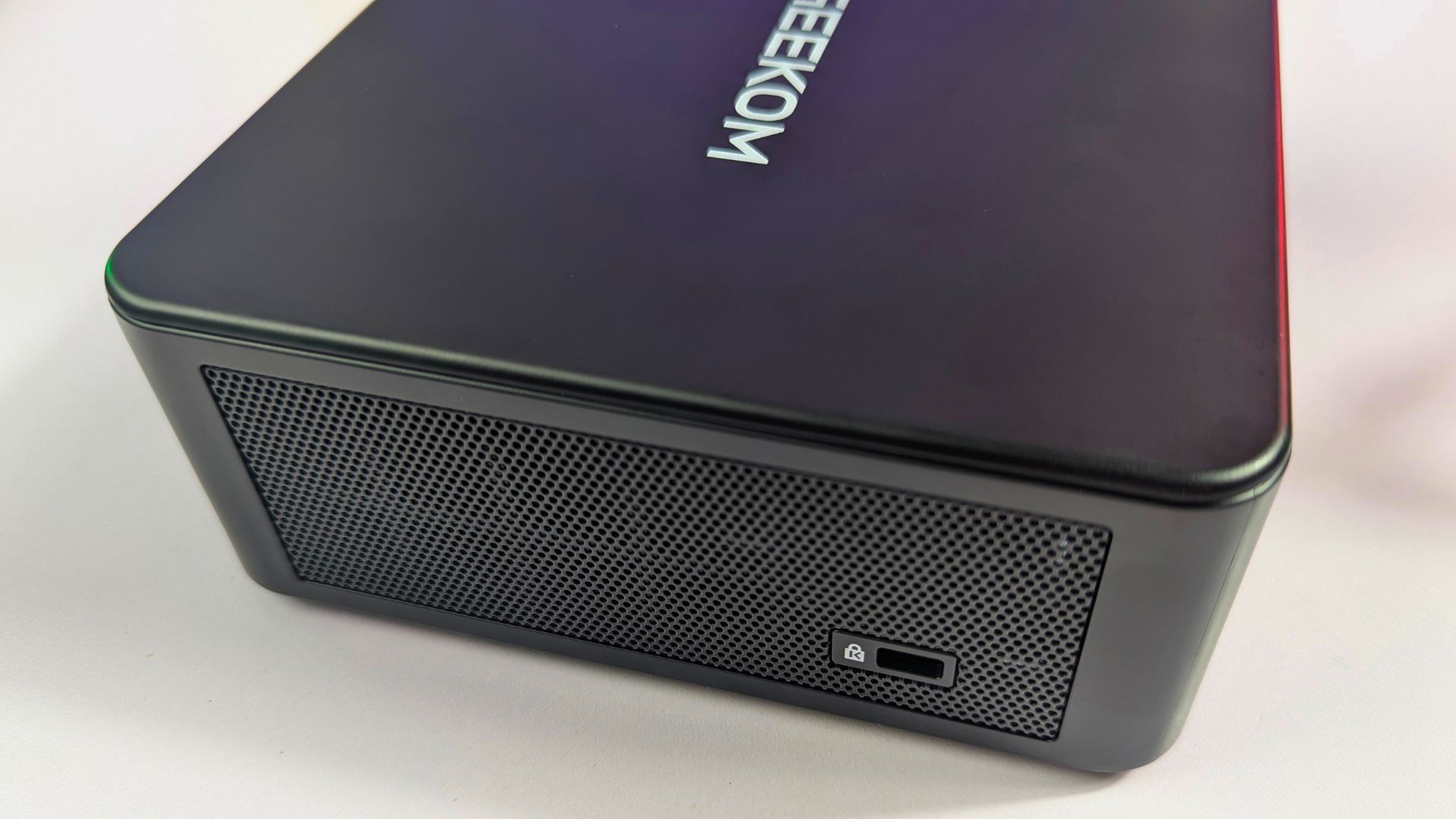
The left side has a full-size SD 4.0 card reader, while the right side has a Kensington Lock slot to secure the device. That combination is useful for creators moving files from cameras and for a mini PC for business installation in a shared office, reception or classroom where the system needs a physical security option.
The rear panel is similarly well equipped. It provides two USB4 Type-C ports, with one supporting DisplayPort Alt Mode and Type-C power input, alongside two HDMI 2.0 ports and two 2.5Gbps Ethernet ports. A fifth USB 3.2 Gen 2 Type-A port and a USB 2.0 Type-A port complete the rear I/O, with the latter retaining compatibility with older keyboards and similar peripherals.
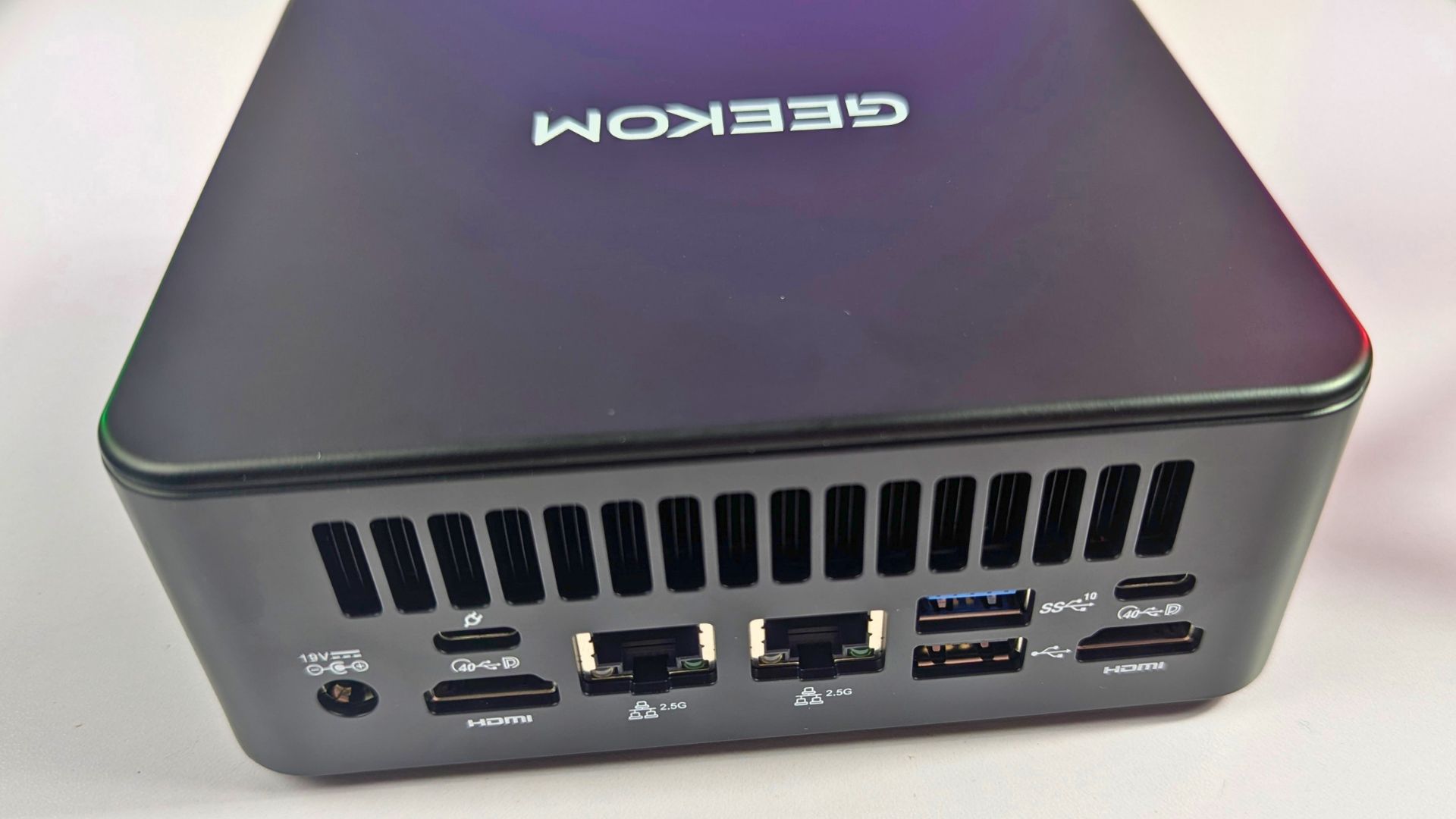
At 132mm square, the GEEKOM IT13 Max remains easy to place, but it offers more USB ports than many small desktop systems. The mix of six Type-A ports, dual USB4, a full-size SD reader and four potential display connections makes it a flexible mini PC with Intel processor for a peripheral-heavy desk without a separate USB hub.
Popular right now
What people are buying this month
Prices as listed on each store

GPD WIN 5 (AI Max HX 385 - 32GB_RAM/1TB_NVME) (Raven Black)



 on 15 storesGPD WIN 5 (AI Max HX 385 - 32GB_RAM/1TB_NVME) (Raven Black)Choose where to buy — prices as listed on each store.
Prices are the ones Weekly last read from each store — check the store page before you buy.


MANGMI Pocket Max (Snapdragon 865 - 8GB_RAM/128GB_STORAGE) (Retro GB)
 on 14 storesMANGMI Pocket Max (Snapdragon 865 - 8GB_RAM/128GB_STORAGE) (Retro GB)Choose where to buy — prices as listed on each store.
Prices are the ones Weekly last read from each store — check the store page before you buy.
 RETROID Pocket 6 - 12GB RAM/128GB SSD [SILVER]Choose where to buy — prices as listed on each store.
Prices are the ones Weekly last read from each store — check the store page before you buy.
GEEKOM IT13 Max Technical Specifications
The GEEKOM IT13 Max review configuration is led by the Intel Core Ultra 9 185H at a 45W TDP, with a stated maximum operating range of 55W, plus Intel Arc graphics. Depending on configuration, buyers can choose 16GB DDR5 with a 1TB PCIe Gen4 SSD and dual SO-DIMM upgradeability up to 96GB, or 24GB LPDDR5 with a 500GB PCIe Gen4 SSD. Two M.2 storage slots, dual 2.5GbE, Wi-Fi 7 and Bluetooth 5.4 reinforce its credentials as one of the better connected Intel compact computers in this size class.
| Specification | Details |
|---|---|
| CPU | Intel Core Ultra 9 185H |
| CPU power | Ultra 9 TDP: 45W; stated maximum operating range: 55W |
| Graphics | Intel Arc graphics |
| Memory - V1 (16GB + 1TB) | High-speed DDR5 SO-DIMM; up to 96GB |
| Memory - V1 (24GB + 500GB) | Onboard LPDDR5 |
| Audio | HDA CODEC |
| Primary storage | 1 × M.2 2280 PCIe NVMe Gen 4 SSD slot; up to 4TB |
| Secondary storage | 1 × M.2 2242 SATA III SSD slot; up to 2TB |
| Rear USB | 1 × USB 3.2 Gen 2 Type-A; 1 × USB 2.0 Type-A |
| Front USB | 4 × USB 3.2 Gen 2 Type-A; one supports S5 Always On (software option) |
| USB4 | 2 × USB4 Type-C on the rear; one supports Type-C power input |
| Audio port | 1 × 3.5mm stereo headset jack on the front |
| Ethernet | 2 × RJ45, 2.5Gbps |
| Display outputs | 2 × HDMI 2.0 on the rear |
| Other ports | 1 × DC input, 1 × power button, 1 × Kensington Lock, 1 × SD Card 4.0 reader |
| LEDs | 2 × power LEDs; power on: white, always on; MS: white, flashing |
| Ethernet LED colours | 10/100Mbps: off; 1,000Mbps: yellow; 2,500Mbps: green |
| Wireless | Intel M.2 Wi-Fi 7; Bluetooth 5.4 |
| Security | dTPM 2.0 support; Kensington Lock |
| Battery | RTC coin battery |
| Power adapter | 19V, 120W adapter with geo-specific IEC C5 AC cord |
| PCBA dimensions | 127.6 × 126.1 × 1.6mm |
| System dimensions | 5.19 × 5.19 × 1.96 inches (132 × 132 × 50mm) |
| Weight | 836g (1.84 lbs) |
| Certifications | CE, FCC, CB, CCC and RoHS |
| Operating system | Microsoft Windows 11 Pro 23H2 |
| Included accessory | VESA mount |
Power Usage
The power measurements place the system at around 7.3W when idle on the desktop, 18–34W during average use and 64.7W while running Cinebench at full load. In this GEEKOM IT13 Max review, those figures show a large gap between light desktop work and sustained processor testing, as expected from a 45W-class Intel Mini PC; they should be read as the test measurements rather than a universal figure for every workload, memory configuration or connected peripheral set.
Fan Noise & Temperatures
GEEKOM says that all IT13 Max models use its upgraded IceBlast 3.0 cooling system for stronger heat dissipation and quieter operation. The GEEKOM IT13 Max review results matter here because the Core Ultra 9 185H is configured for a substantially higher power envelope than entry-level mini PCs, so sustained cooling is central to whether its benchmark performance is useful in practice.
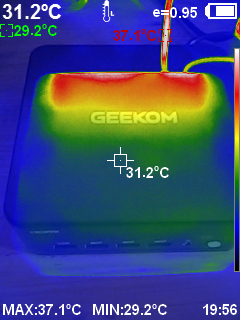
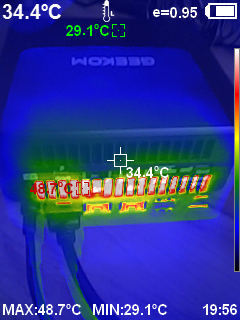
At idle, the fan was barely audible in an average office environment. Under full Cinebench load, the recorded fan noise reached 60dB, so this is not a silent result during sustained all-core work even if the system is unobtrusive for lighter use. The highest recorded temperature while running Cinebench was 50°C. That is a very cool result for a full-load reading.
GEEKOM IT13 Max System Benchmarks
The benchmark comparisons below place the IT13 Max alongside GEEKOM mini PCs from the past year at different price levels. The closest comparison is the GEEKOM IT13 2025, the previous-year model, because it shows how the newer system’s Core Ultra 9 and Arc graphics change the performance position within the range.
PCMark 10
In PCMark 10, the GEEKOM IT13 Max review unit scored 7,018, compared with 5,492 for the GEEKOM IT13 2025. That is a 27.8% higher score in this comparison and puts the IT13 Max ahead of the A7 2026’s 6,318 result, suggesting a stronger platform for broad productivity workloads rather than a narrow single-app use case.
| Model | PCMark 10 score |
|---|---|
| GEEKOM A5 2025 | 5,752 |
| GEEKOM Air 12 2026 | 3,470 |
| GEEKOM Air 12 Lite | 3,230 |
| GEEKOM IT13 2025 | 5,492 |
| GEEKOM A7 2026 | 6,318 |
| GEEKOM IT13 Max | 7,018 |
PassMark
The IT13 Max recorded 6,845.4 in PassMark, against 4,742.3 for the IT13 2025. For this GEEKOM IT13 Max review, the 44.3% gap is the largest general-system uplift in the comparison set and supports the case for choosing the newer machine when compilation, heavier multitasking or more demanding desktop applications are regular parts of the workload.
| Model | PassMark score |
|---|---|
| GEEKOM A5 2025 | 3,869.6 |
| GEEKOM Air 12 2026 | 1,809.1 |
| GEEKOM Air 12 Lite | 1,252.2 |
| GEEKOM IT13 2025 | 4,742.3 |
| GEEKOM A7 2026 | 3,640 |
| GEEKOM IT13 Max | 6,845.4 |
Cinebench R23 and Cinebench 2026
Cinebench R23 shows a smaller 1.2% increase in single-core performance, from 1,733 on the IT13 2025 to 1,754 on the IT13 Max, but a much more meaningful 31.6% increase in multi-core performance, from 11,369 to 14,965. For buyers comparing Intel small form factor PCs for rendering, exports or other multi-threaded tasks, that multi-core gap is the more useful part of the result. Additional Cinebench 2026 readings are 2,583 for CPU Multiple Threads, 598 for CPU Single Core and 427 for CPU Single Thread.
| Model | Cinebench R23 single-core | Cinebench R23 multi-core |
|---|---|---|
| GEEKOM A5 2025 | 1,397 | 7,066 |
| GEEKOM Air 12 2026 | 1,097 | 2,376 |
| GEEKOM Air 12 Lite | 902 | 2,724 |
| GEEKOM IT13 2025 | 1,733 | 11,369 |
| GEEKOM A7 2026 | 1,687 | 8,106 |
| GEEKOM IT13 Max | 1,754 | 14,965 |
3DMark Time Spy, Night Raid and Fire Strike
The GEEKOM IT13 Max review unit delivered 3,961 in 3DMark Time Spy, more than double the IT13 2025’s 1,861 score - a 112.8% increase in this benchmark. The additional graphics results are 28,787 in Night Raid and 7,903 in Fire Strike, both in the higher range of the results and consistent with a major graphics uplift over the older IT13 in this test group.
| Model | 3DMark Time Spy score |
|---|---|
| GEEKOM A5 2025 | 1,376 |
| GEEKOM Air 12 2026 | 735 |
| GEEKOM Air 12 Lite | 366 |
| GEEKOM IT13 2025 | 1,861 |
| GEEKOM A7 2026 | 1,207 |
| GEEKOM IT13 Max | 3,961 |
GEEKOM IT13 Max Game Benchmarks
The GEEKOM IT13 Max has Intel Arc graphics and is suited to light-to-medium PC gaming at sensible settings. It should not be treated as a substitute for a dedicated graphics card, but the results below indicate that it is a credible mini PC for streaming and casual gaming when expectations are matched to its integrated graphics.
Forza Horizon 5
Forza Horizon 5 returned 68 FPS at 1080p using Very Low graphics settings and 92 FPS at 720p using the same preset. The 1080p result clears a 60 FPS target in this test, while 720p leaves more headroom for users who favour smoother motion over higher image resolution with the possibility to increase graphics quality.

Cyberpunk 2077
Cyberpunk 2077 recorded 29.94 FPS at 1080p Low settings with no FSR and 44.86 FPS at 720p Low settings with no FSR. These results show that the game is more demanding for the integrated Arc graphics; reducing resolution helps, as will using FSR.
Shadow of the Tomb Raider
Shadow of the Tomb Raider achieved 56 FPS at 1080p on the Lowest graphics settings and 77 FPS at 720p on the Lowest preset. It is another example of a playable lighter-demanding title at reduced settings, with 720p offering the more comfortable margin in the results.
Day-to-Day Operation
The GEEKOM IT13 Max can drive up to four 4K displays through its two USB4 and two HDMI 2.0 outputs, or up to 8K over the dual USB4 ports, according to GEEKOM. That capacity makes this GEEKOM IT13 Max review particularly relevant to mini PC for home office buyers who need several displays, external storage and a wired network; a compatible USB 4.0 Type-C cable or USB Type-C to HDMI adapter cable may be useful where a display setup needs them.
For regular home and office use, the system is suited to Microsoft Edge, Google Chrome, Firefox, YouTube, Netflix and Spotify. Light work can include Google Docs, Google Sheets, WPS Office, Slack, Google Drive, OneDrive, Trello, Notion, Canva, iMovie and CapCut, while more demanding workloads may include Microsoft Word, Excel, PowerPoint, Zoom, Adobe Photoshop and Adobe Premiere Pro. Actual performance will depend on the project, media and memory configuration, but the CPU benchmarks point to useful headroom beyond basic document and browser work.
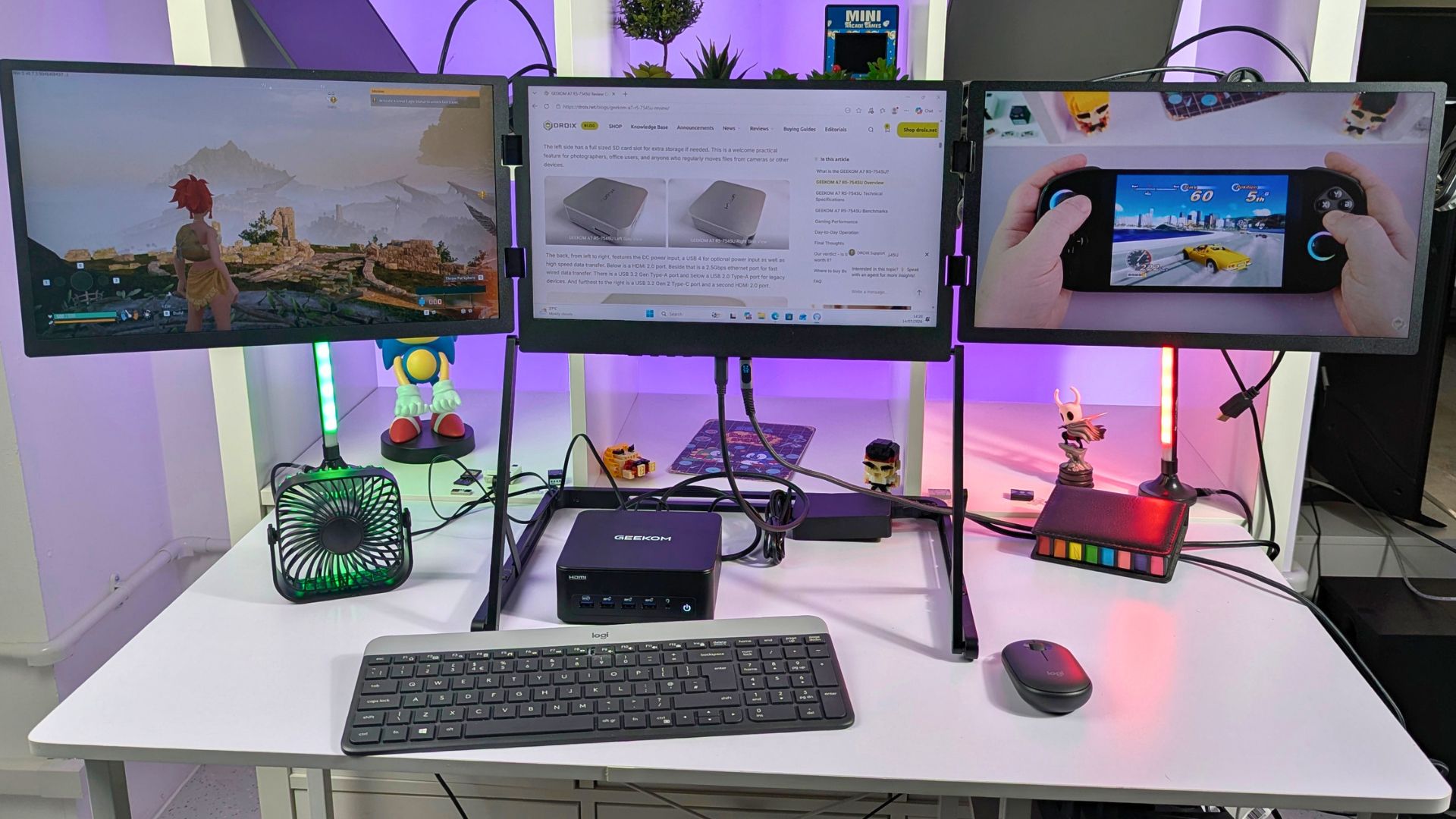
For IT-focused work, it can serve as a development mini PC for Visual Studio Code, JetBrains IntelliJ IDEA, Eclipse and PyCharm; it can also support database management such as MySQL, virtualisation tools such as Vagrant, and web-development tools including Postman and Fiddler. The dual 2.5GbE ports also make a sensible case for Smart Home setup, a media server or a networked lab, although storage, operating-system configuration and software requirements need to be planned for those roles.
The GEEKOM IT13 Max can also function as a gaming mini PC, especially for lighter titles or games where reduced settings are acceptable. This GEEKOM IT13 Max review suggests that Intel Arc graphics may still trail comparable AMD graphics used in some mini PCs, but the Forza Horizon 5 and Shadow of the Tomb Raider results show decent playable performance at their tested settings.
That distinction matters for buyers choosing among mini PCs. This model is better positioned as a compact all-rounder that includes gaming capability than as a machine built primarily to chase high-detail, modern AAA gaming performance.
Final Thoughts
Compared with the GEEKOM IT13 2025 in the results, the IT13 Max makes its biggest gains in multi-core CPU and graphics tests: 31.6% in Cinebench R23 multi-core and 112.8% in 3DMark Time Spy. Single-core Cinebench R23 changes by only 1.2%, so the upgrade case is strongest for sustained multi-threaded work, graphics-heavy acceleration and broader system performance rather than basic single-thread desktop responsiveness.
This GEEKOM IT13 Max review places it in the higher end of mini Intel desktops because it combines a 45W Core Ultra 9 processor, Intel Arc graphics, dual USB4, dual 2.5GbE, Wi-Fi 7, four-display support and substantial storage expansion in a compact chassis. The 16GB DDR5 configuration is the relevant choice for buyers who need the stated up-to-96GB memory path; the 24GB LPDDR5 configuration should be chosen with its different memory design in mind.
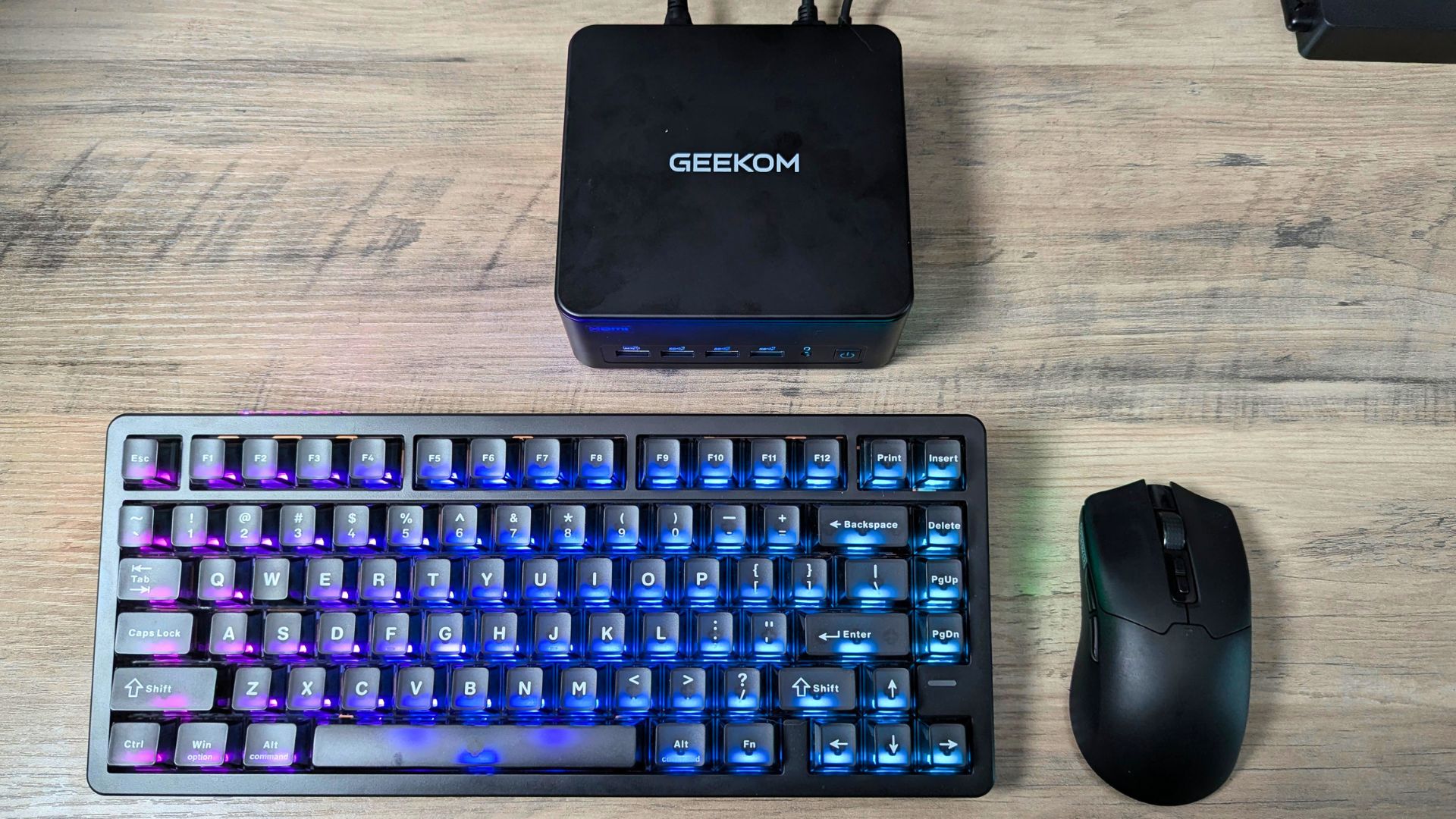
Its strongest use cases are demanding home and office workflows, multi-display desks, media work, development, network-aware installations, Smart Home projects, media-server duties and light-to-medium PC gaming. The port selection and VESA mount add deployment flexibility, while the power results suggest modest draw in lighter desktop use and a much higher but measured draw under full Cinebench load.
The positives are the solid metal build, the broad port selection, the performance improvements over the IT13 2025, the low recorded 50°C Cinebench temperature, and GEEKOM’s stated three-year warranty. The trade-offs are the 60dB full-load fan measurement, integrated Arc graphics that trail comparable AMD graphics in some mini PCs, and configuration-dependent memory upgradeability.
Our verdict - Is the GEEKOM IT13 Max worth buying for demanding compact-desktop work?
Short answer: Yes, if you need strong multi-core performance, exceptional connectivity and four-display flexibility in a small desktop, and can accept integrated-graphics limits in demanding games.
Best for: Multi-display productivity, development, content work, networked home or business setups, media duties and lighter PC gaming.
Not ideal for: Buyers who want quiet all-core operation or high-detail AAA gaming performance from integrated graphics.
Rating: 8/10 - based on the benchmark and operating measurements.
Where to buy the GEEKOM IT12 Max
You can purchase the GEEKOM IT13 Max from the below stores. Use the discount code ”DRT13MAX" on the store for a massive 8% off
GEEKOM STORE: USA | FRANCE | GERMANY | UNITED KINGDOM
AMAZON STORE: USA | FRANCE | GERMANY | UNITED KINGDOM
UPDATE: 15% off sale starting August 11th, endingAugust 30th, use the code ”TYT13DFF”
AMAZON STORE: USA | CANADA | UK | AUSTRALIA
Frequently Asked Questions
Is the GEEKOM IT13 Max good for a home office?
Yes. The four-display capability, six USB Type-A ports, dual USB4, Wi-Fi 7 and dual 2.5GbE make it well suited to a multi-device home-office setup, subject to compatible displays and cables.
Can the GEEKOM IT13 Max run four monitors?
Yes. GEEKOM states that the two USB4 ports and two HDMI 2.0 ports can drive up to four 4K monitors; it also states that dual USB4 can provide up to 8K visuals. Resolution and refresh-rate combinations depend on the display hardware and connection used.
Is the GEEKOM IT13 Max suitable for gaming?
It is suitable for light-to-medium gaming at adjusted settings. The results show 68 FPS in Forza Horizon 5 at 1080p Very Low and 56 FPS in Shadow of the Tomb Raider at 1080p Lowest, while Cyberpunk 2077 is more demanding at the tested settings.
Can the GEEKOM IT13 Max be upgraded to 96GB of RAM?
The 16GB DDR5 + 1TB configuration supports up to 96GB through DDR5 SO-DIMM memory. The 24GB + 500GB configuration uses onboard LPDDR5, so buyers should confirm the exact configuration before purchase.
Is the GEEKOM IT13 Max a good mini PC for business?
Yes, for businesses that value compact deployment, multiple displays, fast wired networking and physical security. Its dual 2.5GbE ports, Kensington Lock, dTPM 2.0 support and VESA mount are particularly relevant for office, kiosk, lab and managed-desk installations.
GEEKOM IT13 Max review
The GEEKOM IT13 Max packs powerful 13th-generation Intel performance and extensive connectivity into a sleek, space-saving mini PC ideal for demanding work and everyday use.
Mikä meille piti
- Powerful Intel Core Ultra 9 185H performance
- Compact, premium design
- Excellent port selection
- Upgradeable RAM and storage
- Ideal for work and streaming
Voisi olla parempi
- Intel gaming performance still does not match similar AMD processors

Bringer of videos, text and images! AKA the social media guy at DROIX. Massive retro gaming fan and collector, with a far too large collection of consoles and computers from 1970's to modern. Contact me at [email protected]
Kysymykset ja kommentit
0
Jokainen kysymys saa vastauksen. Kysy ennen ostamista — DaveC ja tiimi vastaavat yhden työpäivän sisällä, ja vastaukset pysyvät julkisina, joten ne auttavat seuraavaa lukijaa.