



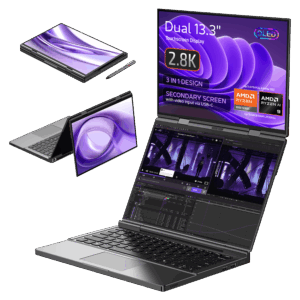
Lejupielādes GPD DUO
programmaparatūra, BIOS, draiveri un rīki — skenēti un versijas Pilna bibliotēkaVersijas (3)
- Portatīvā versija — instalācija nav nepieciešama. Atarhivēšanas parole: 123.
- MotionAssistant izmanto Winring0 draiveri TDP regulēšanai, aparatūras uzraudzībai un ventilatora vadībai. Ja šīs funkcijas pārstāj darboties, atļaujiet MotionAssistant Windows drošības centrā — Microsoft var atzīmēt šo draiveri.
- Kas jauns versijā v1.2.0.9:
- Pielāgots žiroskops Legion Go 2 ierīces korpusā (kontrollera žiroskops un ventilatora vadība vēl nav pielāgota).
- Pielāgots atbalsts dažādiem nesen izlaistiem AMD pārdēvētiem modeļiem.
- Papildu iestatījumos pievienota opcija "Atspējot planšetdatora režīmu"; kad tā ir atspējota, planšetdatora režīms izslēdzas nākamajā palaišanas reizē.
- RTSS OSD iestatījumos pievienota OSD pārslēgšanas karstā taustiņa funkcija; vienkāršotajā režīmā pievienota temperatūras rādīšana.
- Pievienots 30 sekunžu TDP atiestatīšanas cikls, kas atkārtoti piemēro pašreizējo TDP, ja tiek konstatēts neparasts samazinājums; pievienotas TDP ±5 karstās taustiņas.
- Optimizēts Win5 tastatūras taustiņš: nospiediet, lai parādītu ekrāna tastatūru, nospiediet vēlreiz, lai to aizvērtu.
- Optimizēta CPU frekvences augšējās robežas kontrole, izmantojot "Optimize CPU Frequency"; maksimālā frekvence tiek atjaunota, kad opcija ir atspējota.
- Uzlabotas dažas vadīklas tumšajā režīmā; virsraksta josla tagad ir tumšākā krāsā.
- Optimizēta žiroskopa simulācija pēc atsākšanas no hibernācijas, novēršot kļūmes dažās ierīcēs pēc pamošanās.
- Optimizēta karsto taustiņu noteikšana (īsāks noteikšanas intervāls); spilgtuma karstie taustiņi tagad regulējas par ±10.
- Norādīts ze_loader.dll kā 1.11.0. Intel modeļiem, kas nespēj nofiksēt GPU frekvenci, vispirms jāinstalē Intel 6647 iGPU draiveris, pēc tam jāatjaunina uz jaunāko.
- Novērsta problēma, kad jaudas ierobežojums tika bloķēts pie 65W un to nevarēja atjaunot, kad GPD Win5 tiek barots ar USB-C.
- Laboti daži teksta attēlojumi; novērsta nepareiza OSD monitoringa rādīšana, kad aparatūras monitorings ir izslēgts.
- Novērsta problēma, kad LT/RT netika reģistrēti kā karstie taustiņi.
- Novērsta iesaldēšanās, secīgi iestatot TDP.
- Novērsta problēma, ka noteiktas spēļu profila opcijas (piem., CPU frekvences ierobežojumi) netika piemērotas automātiski.
- Novērsta kadru bloķēšanas kļūme dažos spēļu profilos; kadru bloķēšana tagad izmanto RTSS procesam specifisku konfigurāciju, nevis globālo.
- Novērsta avārija, atsvaidzinot sistēmas paliktņa ikonu.
- Tās pašas v1.2.0.9 laidiena instalētāja versija (Setup) — instalē Program Files mapē, nevis darbojas pārnēsājamā režīmā.
- RivaTuner Statistics Server papildu būvējums (RTSS 737) MotionAssistant ekrānā redzamajam displejam (OSD) un kadru bloķēšanas uzraudzībai. Instalējiet kopā ar MotionAssistant.
Vecākās versijas paliek lejupielādējamas atgriešanai — katrai versijai saglabājas savs pārbaudītais fails.
Izmaiņu žurnāls
- GPD DUO (8840U) Windows 11 24H2 Home programmaparatūra (aktuālā priekš 8840U) | 2024-12-20 |
A009376A9F17E881F81FE484E16BF54D3E8E8759| tikai 8840U variants. Ietver integrētos Windows 11 draiverus. Pārinstalēšana noņem visus datus C diskā — vispirms izveidojiet dublējumu. SHA1 rīks: HashTools ·
Vecākās versijas paliek lejupielādējamas atgriešanai — katrai versijai saglabājas savs pārbaudītais fails.
Versijas (2)
- AMD GPU draiveris 12.1 — novērš iGPU ekrāna plīsumu GPD DUO (AI 9 HX 370). Avots: GPDStore ceļvedis "How to fix the GPD Duo screen tearing issue".
- GPD DUO (370) iGPU draiveri — ekrāna plīsuma labojums | — | 2024-12-06 | tikai AI 9 HX 370 | iGPU draiveru pakotne, kas novērš ekrāna plīsuma problēmu. Pēc izvilkšanas izpildiet
AutoInstallDrivers.batpakotnes failu.
Vecākās versijas paliek lejupielādējamas atgriešanai — katrai versijai saglabājas savs pārbaudītais fails.
Izmaiņu žurnāls
- DTS:X Audio Technology, 3D Sound Field | 2024-12-24 | Pēc lejupielādes atarhivējiet un izpildiet
DTS_install.bat, lai instalētu automātiski - DTS:X audio tehnoloģija, 3D skaņas lauks | 2025-12-24 | Pēc lejupielādes atspiediet arhīvu un izpildiet
DTS_install.bat, lai instalētu automātiski
Vecākās versijas paliek lejupielādējamas atgriešanai — katrai versijai saglabājas savs pārbaudītais fails.
Izmaiņu žurnāls
- GPD DUO (AI 9 HX 370) Windows 11 24H2 Home programmaparatūra (pašreizējā 370 versijai) | 2025-03-18 |
30B2D557AEB549ACDC6C36D4E1DE95F209614BBE| tikai 370 variants. Pirms sistēmas programmaparatūras atjaunināšanas obligāti jāatjaunina BIOS — vispirms instalējiet BIOS V2.12 (skatiet sadaļu BIOS). BIOS programmaparatūra v2.12 arī novērš mirgošanas problēmu 370 versijā. SHA1 rīks: HashTools · - GPD Pocket 4 (8840U / 365 / 370) Windows 11 24H2 Home programmaparatūra (aktuālā) | 2025-03-18 |
30B2D557AEB549ACDC6C36D4E1DE95F209614BBE| Ietver jaunāko integrētās grafikas draiveri; novērš problēmu, kad iekšējais ekrāns nedarbojas, pieslēdzoties GPD G1. Aptver visas trīs APU versijas. Pārinstalēšana izdzēš visus datus C diskā — vispirms izveidojiet dublējumu. SHA1 rīks: HashTools · - GPD WIN Mini 2025 (8840U / 365 / 370) Windows 11 24H2 Home programmaparatūra (aktuālā) | 2025-03-18 |
30B2D557AEB549ACDC6C36D4E1DE95F209614BBE| Ietver jaunāko integrētās grafikas draiveri; novērš problēmu, kad iekšējais ekrāns nedarbojas, pievienojoties GPD G1. Attiecas uz visiem trim APU variantiem. Pārinstalēšana dzēš visus datus C diskā — vispirms izveidojiet dublējumu. SHA1 rīks: HashTools ·
Vecākās versijas paliek lejupielādējamas atgriešanai — katrai versijai saglabājas savs pārbaudītais fails.
Izmaiņu žurnāls
- AMD Handheld Control v1.0.0 | v1.0.0 | 2026-02-04 | Autors: Deen0X; tikai AMD procesoru sistēmām (aktuāli ar AMD eGPU konfigurācijām).
Vecākās versijas paliek lejupielādējamas atgriešanai — katrai versijai saglabājas savs pārbaudītais fails.
Izmaiņu žurnāls
- GPD DUO (8840U / 370) draiveri (aktuālie) | v4.1.0 | 2025-01-18 | Abi varianti | Jaunākā draiveru pakotne. Pēc izvilkšanas veiciet dubultklikšķi uz
AutoInstallDrivers.bat, lai veiktu automātisko instalēšanu. - WIN 4 (8840U / 7840U / 7640U / 6800U) draiveri (aktuālie) | v4.1.0 | 2025-01-18
- GPD WIN 4 2025 (8840U / 370) Draiveri (pašreizējie) | V4.1.0 | 2025-01-18 | Jaunākā draiveru pakotne. Pēc izvilkšanas veiciet dubultklikšķi uz
AutoInstallDrivers.bat, lai veiktu automātisko instalāciju. - WIN Max 2 (8840U / 7840U / 7640U / 6800U) Draiveri (aktuālie) | v4.1.0 | 2025-01-18
- Pārdevēja lapa: https://www.amd.com/en/support/download/drivers.html
Vecākās versijas paliek lejupielādējamas atgriešanai — katrai versijai saglabājas savs pārbaudītais fails.
Izmaiņu žurnāls
- GPD DUO (370) BIOS (aktuālā 370 versijai) | v2.17 | 2025-03-26 | tikai AI 9 HX 370 | Optimizētas ar miegu saistītās problēmas. Pievienota akumulatora uzlādes sliekšņa pārvaldība. Novērsta skārienievade sekundārajos ekrānos, ko izraisīja BIOS versija v2.16.
Vecākās versijas paliek lejupielādējamas atgriešanai — katrai versijai saglabājas savs pārbaudītais fails.
Izmaiņu žurnāls
- GPD DUO (8840U) BIOS (aktuālā 8840U) | v3.08 | 2025-03-24 | tikai 8840U | Optimizētas ar miega režīmu saistītās problēmas. Pievienota akumulatora uzlādes sliekšņa pārvaldība BIOS galvenajā lapā.
Vecākās versijas paliek lejupielādējamas atgriešanai — katrai versijai saglabājas savs pārbaudītais fails.
Izmaiņu žurnāls
- GPD DUO (AI 9 HX 370) Windows 11 24H2 Home programmaparatūra (pašreizējā 370 versijai) | 2025-03-18 |
30B2D557AEB549ACDC6C36D4E1DE95F209614BBE| tikai 370 variants. Pirms sistēmas programmaparatūras atjaunināšanas obligāti jāatjaunina BIOS — vispirms instalējiet BIOS V2.12 (skatiet sadaļu BIOS). BIOS programmaparatūra v2.12 arī novērš mirgošanas problēmu 370 versijā. SHA1 rīks: HashTools · - GPD DUO (8840U) Windows 11 24H2 Home programmaparatūra (aktuālā priekš 8840U) | 2024-12-20 |
A009376A9F17E881F81FE484E16BF54D3E8E8759| tikai 8840U variants. Ietver integrētos Windows 11 draiverus. Pārinstalēšana noņem visus datus C diskā — vispirms izveidojiet dublējumu. SHA1 rīks: HashTools · - GPD MicroPC 2 Windows 11 24H2 Home programmaparatūra (aktuālā) | 2025-10-30 |
F310F45676F905E93B86C9AE1E6E059E817AE4C2| Integrēti aparatūras draiveri. Pēc lejupielādes un atarhivēšanas skatiet video pamācību avota lapā, lai iegūtu instalēšanas norādījumus. · - GPD MicroPC 2 Windows 11 24H2 Pro programmaparatūra | 2025-08-26 |
B3BB0C050AA6D7545BAF05EFF810D1238AD22531| Pro izdevums. Integrēti aparatūras draiveri. Pēc lejupielādes un atarhivēšanas skatiet video pamācību par instalēšanas norādēm. Neobligāti: instalējiet Intel® Driver & Support Assistant lai uzturētu draiverus aktuālus. SHA1 rīks: HashTools ·
Vecākās versijas paliek lejupielādējamas atgriešanai — katrai versijai saglabājas savs pārbaudītais fails.
Izmaiņu žurnāls
- GPD DUO un GPD Pocket 4 pirksta nospieduma draiveris (Windows) | 2025-02-17 | Windows 11 pirksta nospieduma draiveris V5.2.69.24 WHQL — attiecas gan uz GPD DUO, gan [[gpd-pocket-4]]
- GPD DUO un GPD Pocket 4 pirkstu nospiedumu draiveris (Windows) | 2025-02-17 | Windows 11 pirkstu nospiedumu draiveris V5.2.69.24 WHQL priekš GPD DUO un Pocket 4
Vecākās versijas paliek lejupielādējamas atgriešanai — katrai versijai saglabājas savs pārbaudītais fails.
Izmaiņu žurnāls
- GPD DUO lietošanas instrukcija (aktuālā) | 2024-11-26 | PDF — atbildes uz GPD DUO biežāk uzdotajiem jautājumiem
Vecākās versijas paliek lejupielādējamas atgriešanai — katrai versijai saglabājas savs pārbaudītais fails.
Izmaiņu žurnāls
- 4G LTE moduļa draiveris | — | 2023-09-19 | Abi varianti | 4G LTE moduļa draivera pakotne. Pēc izvilkšanas veiciet dubultklikšķi, lai sāktu instalāciju.
- 4G LTE moduļa draiveris | — | 2023-09-19 | 4G LTE moduļa draiveru pakotne Pocket 4. Pēc izvilkšanas veiciet dubultklikšķi, lai palaistu instalēšanu.
- 4G LTE moduļa draiveris | 2023-09-19 | Izvelciet un veiciet dubultklikšķi, lai instalētu.
Vecākās versijas paliek lejupielādējamas atgriešanai — katrai versijai saglabājas savs pārbaudītais fails.
Izmaiņu žurnāls
- GPD DUO (370) BIOS un EC programmaparatūra | v2.12 BIOS + v1.30 EC | 2025-02-07 | Tikai AI 9 HX 370 | Novērstas problēmas ar GPD DUO nepievienošanos Nvidia grafikas dokam un ventilatora ātruma nolasīšanu. Obligāts priekšnoteikums pirms 370 sistēmas programmaparatūras atjaunināšanas (2025. gada 18. marta versija).
Vecākās versijas paliek lejupielādējamas atgriešanai — katrai versijai saglabājas savs pārbaudītais fails.
Versijas (8)
- Added options for the On-Screen Keyboard (OSK) and TAPTIP Touch Keyboard. The default setting has been changed to the TAPTIP Touch Keyboard; right-click the button to switch between different keyboards
- Added Keyboard Lock and Touchscreen Lock features. These utilize the original Screenshot button position; right-click to switch between different shortcut buttons
- Added compatibility support for the MINI ULTRA model
- Noņemts UAC uzvedne, palaižot RTSS, un atspējoti automātiskie atjauninājumi, lai nodrošinātu vienmērīgāku lietotāja pieredzi.
- Uzlabota kadru ātruma ierobežotāja lietotāja saskarnes stabilitāte.
- Novērsta kļūda saistībā ar barošanas savienojuma funkciju.
- Novērsta problēma, kad TDP netika automātiski piemērots pirmajā palaišanas reizē.
- Pievienoti ekrāna atsvaidzes intensitātes regulēšanas iestatījumi.
- Pievienotas kontrollera vibrācijas regulēšanas opcijas.
- Palielināts regulējamais jaudas ierobežojums līdz 100W modelim WIN 5 un līdz 40W citiem modeļiem.
- Pievienota 144 FPS kā jauna kadru ātruma ierobežojuma opcija.
- Pievienoti noderīgi padomi par funkcijām saskarnes augšdaļā.
- Ekrāna tastatūras iestatījumiem pievienotas OSK un TabTip tastatūras opcijas. Ar peles labo pogu noklikšķiniet uz pogas, lai izvēlētos opciju
- Operētājsistēmā WIN 5 fizisko pogu var izmantot, lai parādītu tastatūru.
- Novērstas vairākas kļūdas.
- Pēc lietotāja saskarnes aizvēršanas fona pakalpojums vairs neveiks nekādas darbības. Tas novērš problēmu, kas izraisīja neparastu ventilatora darbību sistēmas palaišanas laikā.
- Pievienoti enerģijas regulēšanas parametri GPD MAX3.
- Novērstas slēptas kļūdas.
- Atjaunināts kodola draiveris uzlabotai stabilitātei; nav nepieciešams pievienot balto sarakstu, nav antivīrusa brīdinājumu.
- Novērsta problēma ar automātiskiem daudzvalodu iestatījumiem instalācijas laikā.
- Pievienoti ķīniešu, japāņu un korejiešu valodas uzvednes veiktspējas uzraudzības horizontālajām un vertikālajām pogām.
- Mainīta TDP PL2 aprēķina metode uz PL1+1 precīzākai enerģijas patēriņa bloķēšanai.
- Avota pamācība: GPD rīka lejupielāde, iestatīšanas pamācība un problēmu novēršana GPD ierīcēm
- Avota pamācība: GPD rīka lejupielāde, iestatīšanas pamācība un problēmu novēršana GPD ierīcēm
- Avota pamācība: GPD rīka lejupielāde, iestatīšanas pamācība un problēmu novēršana GPD ierīcēm
Vecākās versijas paliek lejupielādējamas atgriešanai — katrai versijai saglabājas savs pārbaudītais fails.
Versijas (3)
- Kopienas veidota uz čaulu balstīta MotionAssistant lietotāja saskarnes modifikācija, ko izstrādājis ThatUsernameAlreadyExist — NAV oficiāls GPD izlaidums.
- Vienmēr iegūstiet jaunāko būvējumu no GitHub laidienu lapas (jaunākais: MotionAssistant v1.2.0.9 + Power Mod 2.2.2).
- Uz DROIX mitināts Power Mod instalētāja spoguļkopums (MotionAssistant Setup + Power Mod).
- DROIX mitināts Power Mod pārnēsājamās versijas spogulis.
Vecākās versijas paliek lejupielādējamas atgriešanai — katrai versijai saglabājas savs pārbaudītais fails.