



Вземете това устройство
Осъществено от Weekly
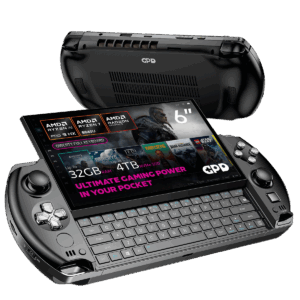
Изтегляния за GPD WIN 4
фърмуер, BIOS, драйвери и инструменти — сканирани и версиирани Пълна библиотекаВсички варианти
Дневник на промените
- WIN 4 (8840U / 7840U / 7640U / 6800U) Драйвери (текущи) | v3.4 | 2024-05-07 | Отделен пакет с драйвери, предназначен за персонализирани инсталации на OS или когато не се използва официалният фърмуерен пакет. След разархивиране стартирайте
AutoInstallDrivers.bat. - WIN Max 2 (8840U / 7840U / 7640U / 6800U) Драйвери (текущи) | v3.4 | 2024-05-07 | Отделен пакет с драйвери за персонализирани инсталации на операционна система или когато не се използва официалният пакет с фърмуер. След разархивиране изпълнете
AutoInstallDrivers.bat.
По-старите версии остават за изтегляне за връщане назад - всяка версия поддържа свой собствен проверен файл.
Дневник на промените
- WIN 4 Ръководство за потребителя | 2022-09-02 | PDF с описания на функционалните клавиши и портовете.
По-старите версии остават за изтегляне за връщане назад - всяка версия поддържа свой собствен проверен файл.
Версии (3)
- Портативна версия — не се изисква инсталация. Парола за разархивиране: 123.
- MotionAssistant използва драйвера Winring0 за регулиране на TDP, хардуерен мониторинг и управление на вентилаторите. Ако тези функции спрат да работят, разрешете MotionAssistant в Windows Security Center — Microsoft може да маркира драйвера.
- Какво ново във v1.2.0.9:
- Адаптиран жироскоп в корпуса на устройството Legion Go 2 (жироскопът на контролера и управлението на вентилатора все още не са адаптирани).
- Адаптирана поддръжка за различни наскоро пуснати ребрандирани модели на AMD.
- Добавена е опция „Деактивиране на режим таблет“ в разширените настройки; когато е деактивирана, режимът таблет се изключва при следващото стартиране.
- Добавен клавиш за превключване на OSD в настройките на RTSS OSD; добавено показване на температурата в опростен режим.
- Добавен 30-секунден цикъл за нулиране на TDP, който прилага отново текущия TDP при открито необичайно понижение; добавени горещи клавиши за TDP ±5.
- Оптимизиран клавиш на клавиатурата Win5: натиснете, за да изведете екранната клавиатура, натиснете отново, за да я затворите.
- Оптимизирано управление на горната граница на честотата на процесора чрез „Оптимизиране на честотата на процесора“; максималната честота се възстановява, когато опцията е деактивирана.
- Подобрени са някои контроли в тъмен режим; заглавната лента вече е в по-тъмен цвят.
- Оптимизирана симулация на жироскоп след възобновяване от хибернация, отстраняване на неизправности при някои устройства след събуждане.
- Оптимизирано откриване на горещи клавиши (по-кратък интервал за преценка); клавишите за яркост вече се регулират с ±10.
- Указва ze_loader.dll като 1.11.0. Intel моделите, които не могат да заключат честотата на GPU, трябва първо да инсталират Intel 6647 iGPU драйвер, след което да актуализират до най-новия.
- Коригирано ограничение на мощността, заключено на 65W и невъзстановимо, когато GPD Win5 се захранва чрез USB-C.
- Коригирани са някои текстови изобразявания; отстранен е проблем, при който OSD мониторингът се показва неправилно, когато хардуерният мониторинг е изключен.
- Коригирано LT/RT да не се регистрират като бързи клавиши.
- Отстранено е замръзване при последователно задаване на TDP.
- Коригирано е автоматичното неприлагане на определени опции за игрови профил (напр. ограничения на честотата на CPU).
- Отстранен проблем със заключването на кадри в някои игрови профили; заключването на кадри вече използва специфична за процеса конфигурация на RTSS вместо глобална.
- Отстранен срив при опресняване на иконата в системния трей.
- Инсталационна версия (Setup) на същото издание v1.2.0.9 — инсталира се в Program Files, вместо да работи преносимо.
- Придружаваща компилация на RivaTuner Statistics Server (RTSS 737) за екранния дисплей (OSD) на MotionAssistant и мониторинга на заключването на кадрите. Инсталирайте заедно с MotionAssistant.
По-старите версии остават за изтегляне за връщане назад - всяка версия поддържа свой собствен проверен файл.
Дневник на промените
- WIN 4 (8840U / 7840U / 7640U / 6800U) Windows 11 24H2 Home фърмуер (текущ) | 2024-12-20 |
730BD7B9D989797488C1509E590085FD9941E80C - GPD WIN 4 2025 (8840U / 370) Windows 11 24H2 Home фърмуер (текущ) | 2024-12-20 |
730BD7B9D989797488C1509E590085FD9941E80C| Обхваща както 8840U, така и AI 9 HX 370 вариантите. Включва интегрирани Windows 11 драйвери. Преинсталацията премахва всички данни на диск C — архивирайте първо. SHA1 инструмент: HashTools · - WIN 4 (6800U) Windows 11 24H2 Home фърмуер (текущ) | 2024-12-20 |
730BD7B9D989797488C1509E590085FD9941E80C - WIN Max 2 (8840U / 7840U / 7640U / 6800U) Windows 11 24H2 Home Firmware (актуален) | 2024-12-20 |
730BD7B9D989797488C1509E590085FD9941E80C
По-старите версии остават за изтегляне за връщане назад - всяка версия поддържа свой собствен проверен файл.
Дневник на промените
- DTS:X Аудио технология, 3D звуково поле | 2024-12-24 | След изтегляне, декомпресирайте и изпълнете
DTS_install.batза автоматично инсталиране - DTS:X Audio Technology, 3D Sound Field | 2025-12-24 | След изтегляне, декомпресирайте и изпълнете
DTS_install.batза автоматична инсталация
По-старите версии остават за изтегляне за връщане назад - всяка версия поддържа свой собствен проверен файл.
Дневник на промените
- Файл за 3D печат на WIN 4 Grip | 2023-04-03 | Файл за 3D печат на дръжка за WIN 4 с подробни инструкции вътре.
- GPD WIN 4 Grip 3D файл за печат | — | 2023-04-03 | 3D файл за печат за дръжка на WIN 4 с подробни инструкции вътре
По-старите версии остават за изтегляне за връщане назад - всяка версия поддържа свой собствен проверен файл.
Дневник на промените
- AMD Handheld Control v1.0.0 | v1.0.0 | 2026-02-04 | От Deen0X; само за системи с AMD процесор (относимо при AMD eGPU конфигурации).
По-старите версии остават за изтегляне за връщане назад - всяка версия поддържа свой собствен проверен файл.
Дневник на промените
- GPD DUO (8840U / 370) драйвери (текущи) | v4.1.0 | 2025-01-18 | И двата варианта | Най-нов драйверен пакет. След разархивиране щракнете двукратно върху
AutoInstallDrivers.batза автоматична инсталация. - WIN 4 (8840U / 7840U / 7640U / 6800U) Драйвери (текущи) | v4.1.0 | 2025-01-18
- GPD WIN 4 2025 (8840U / 370) Драйвери (текущи) | V4.1.0 | 2025-01-18 | Най-нов драйверен пакет. След разархивиране, щракнете двукратно върху
AutoInstallDrivers.batза автоматична инсталация. - WIN Max 2 (8840U / 7840U / 7640U / 6800U) Драйвери (актуални) | v4.1.0 | 2025-01-18
- Страница на доставчика: https://www.amd.com/en/support/download/drivers.html
По-старите версии остават за изтегляне за връщане назад - всяка версия поддържа свой собствен проверен файл.
Дневник на промените
- DTS:X Аудио драйвер | 2024-02-19 | Щракнете с десен бутон върху
DTS_install.bat→ "Run as administrator" за инсталиране;DTS_uninstall.batза деинсталиране.
По-старите версии остават за изтегляне за връщане назад - всяка версия поддържа свой собствен проверен файл.
Дневник на промените
- WIN 4 (8840U / 7840U / 7640U / 6800U) Windows 11 Home Фърмуер | 2024-03-08 | —
- WIN 4 (6800U) Windows 11 Home фърмуер | 2024-03-08 | —
- WIN Max 2 (8840U / 7840U / 7640U / 6800U) Windows 11 Home фърмуер | 2024-03-08 | —
- WIN Mini (8840U / 7840U / 7640U) Windows 11 Home Фърмуер | 2024-03-08 | —
По-старите версии остават за изтегляне за връщане назад - всяка версия поддържа свой собствен проверен файл.
Версии (2)
- WinControls (текущ) | v1.16 | 2024-12-26 | Инструмент за персонализиране на хватовете на WIN 4. Отстранен проблем с клавиша за картографиране на хватовете, който се задаваше по подразбиране на режим мишка. Урок:. Парола за разархивиране:
123 - WinControls (текущ) | v1.16 | 2024-12-26 | Инструмент за персонализиране на хвата за WIN Mini/Max 2. Отстранен проблем с клавиша за картографиране на хвата, който по подразбиране преминава в режим на мишка. Урок:. Парола за разархивиране:
123
- WinControls (текущ) | v1.16 | 2024-12-26 | Инструмент за персонализиране на хватовете на WIN 4. Отстранен проблем с клавиша за картографиране на хватовете, който се задаваше по подразбиране на режим мишка. Урок:. Парола за разархивиране:
123 - WinControls (текущ) | v1.16 | 2024-12-26 | Инструмент за персонализиране на хвата за WIN Mini/Max 2. Отстранен проблем с клавиша за картографиране на хвата, който по подразбиране преминава в режим на мишка. Урок:. Парола за разархивиране:
123
По-старите версии остават за изтегляне за връщане назад - всяка версия поддържа свой собствен проверен файл.
Дневник на промените
- WIN 4 (2023) Ръководство за потребителя | 2023-08-10 | PDF с описания на функционални клавиши и портове.
По-старите версии остават за изтегляне за връщане назад - всяка версия поддържа свой собствен проверен файл.
Дневник на промените
- Ръководство за потребителя на GPD WIN 4 (2025 г.) (текущо) | 2025-01-20 | PDF — описание на функционалните клавиши и портовете на WIN 4 (2025)
По-старите версии остават за изтегляне за връщане назад - всяка версия поддържа свой собствен проверен файл.
Дневник на промените
- WIN 4 Въпроси и отговори | 2022-09-02 | PDF с често задавани въпроси.
По-старите версии остават за изтегляне за връщане назад - всяка версия поддържа свой собствен проверен файл.
Дневник на промените
- WIN 4 (2023) Въпроси и отговори | 2023-08-10 | PDF с често задавани въпроси.
По-старите версии остават за изтегляне за връщане назад - всяка версия поддържа свой собствен проверен файл.
Дневник на промените
- WIN 4 Клавиатурен фърмуер | 2023-02-25 | Предотвратява задействане на клавиатурата поради контакт на екрана с клавиатурата при плъзгане нагоре.
По-старите версии остават за изтегляне за връщане назад - всяка версия поддържа свой собствен проверен файл.
Дневник на промените
- Драйвер за тъчскрийн | 2023-04-17 | Решава проблема с внезапното спиране на работата на тъчскрийна.
По-старите версии остават за изтегляне за връщане назад - всяка версия поддържа свой собствен проверен файл.
Дневник на промените
- Драйвер за 4G LTE модул | — | 2023-09-19 | И двата варианта | Пакет с драйвер за 4G LTE модул. След разархивиране, щракнете двукратно, за да стартирате инсталацията.
- Драйвер за 4G LTE модул | — | 2023-09-19 | Пакет с драйвери за 4G LTE модул за Pocket 4. След разархивиране щракнете двукратно, за да стартирате инсталацията.
- Драйвер за 4G LTE модул | 2023-09-19 | Разархивирайте и щракнете двукратно за инсталиране.
По-старите версии остават за изтегляне за връщане назад - всяка версия поддържа свой собствен проверен файл.
Дневник на промените
- Изходно ръководство: Първи стъпки с AYANEO SLIDE
- Изходно ръководство: Първи стъпки с ONEXPLAYER ONEXFLY
- Изходно ръководство: Първи стъпки с GPD WIN Mini (2023 & 2024)
- Изходно ръководство: Първи стъпки с GPD WIN MAX 2 2023
- Изходно ръководство: Първи стъпки с GPD WIN 4 (2023 и 2024)
- Изходно ръководство: Първи стъпки с вашия преносим гейминг компютър
- Изходно ръководство: Първи стъпки с AOKZOE A1 Pro
- Изходно ръководство: Handheld Companion – Лесно за използване универсално управление на производителност, TDP и движение
По-старите версии остават за изтегляне за връщане назад - всяка версия поддържа свой собствен проверен файл.
Версии (2)
- Изходно ръководство: Първи стъпки с GPD WIN 4 (2023 и 2024)
- Изходно ръководство: Първи стъпки с GPD WIN 4 (2023 и 2024)
По-старите версии остават за изтегляне за връщане назад - всяка версия поддържа свой собствен проверен файл.
Дневник на промените
- Изходно ръководство: Как да актуализирате фърмуера на джойстика GPD WIN 4 2023
По-старите версии остават за изтегляне за връщане назад - всяка версия поддържа свой собствен проверен файл.
Версии (8)
- Added options for the On-Screen Keyboard (OSK) and TAPTIP Touch Keyboard. The default setting has been changed to the TAPTIP Touch Keyboard; right-click the button to switch between different keyboards
- Added Keyboard Lock and Touchscreen Lock features. These utilize the original Screenshot button position; right-click to switch between different shortcut buttons
- Added compatibility support for the MINI ULTRA model
- Премахнато е подканата за UAC при стартиране на RTSS и са деактивирани автоматичните актуализации за по-гладко потребителско изживяване.
- Подобрена стабилност на потребителския интерфейс за ограничаване на кадровата честота.
- Отстранен е бъг с функцията за свързване на захранването.
- Отстранен е проблем, при който TDP не се прилагаше автоматично при първото стартиране.
- Добавени настройки за регулиране на честотата на опресняване на екрана.
- Добавени опции за регулиране на вибрацията на контролера.
- Увеличи регулируемия лимит на мощността до 100W на WIN 5 и 40W на останалите модели.
- Добавени 144 FPS като нова опция за ограничение на кадровата честота.
- Добавени полезни съвети за функциите в горната част на интерфейса.
- Добавени опции за клавиатура OSK и TabTip в настройките на екранната клавиатура. Щракнете с десния бутон върху бутона, за да изберете опция
- На WIN 5 физическият бутон може да се използва за извеждане на клавиатурата.
- Отстранени са няколко грешки.
- След затваряне на потребителския интерфейс фоновата услуга вече няма да изпълнява никакви операции. Това коригира проблем, причиняващ необичайно поведение на вентилатора при стартиране на системата.
- Добавени параметри за настройка на мощността за GPD MAX3.
- Отстранени скрити грешки.
- Актуализиран драйвер на ядрото за подобрена стабилност; не е необходимо добавяне към списък с разрешени, без предупреждения от антивирусна програма.
- Отстранен проблем с автоматичните настройки за многоезичност по време на инсталация.
- Добавени подсказки на китайски, японски и корейски език към хоризонталните и вертикалните бутони за мониторинг на производителността.
- Методът за изчисляване на TDP PL2 е променен на PL1+1 за по-точно заключване на консумацията на енергия.
- Изходно ръководство: GPD Tool Download, Setup Guide & Troubleshooting for GPD Devices
- Изходно ръководство: GPD Tool Download, Setup Guide & Troubleshooting for GPD Devices
- Изходно ръководство: GPD Tool Download, Setup Guide & Troubleshooting for GPD Devices
По-старите версии остават за изтегляне за връщане назад - всяка версия поддържа свой собствен проверен файл.
Дневник на промените
- Изходно ръководство: Отстраняване на неизправности при GPD WIN 4 (2022)
По-старите версии остават за изтегляне за връщане назад - всяка версия поддържа свой собствен проверен файл.
Версии (3)
- Общностна модификация на потребителския интерфейс на MotionAssistant, базирана на shell, от ThatUsernameAlreadyExist — НЕ е официално издание на GPD.
- Винаги изтегляйте най-новата версия от страницата с издания на GitHub (последна: MotionAssistant v1.2.0.9 + Power Mod 2.2.2).
- Огледален сървър, хостван от DROIX, на инсталатора на Power Mod (MotionAssistant Setup + Power Mod).
- DROIX-хоствано копие на преносимата версия Power Mod.
По-старите версии остават за изтегляне за връщане назад - всяка версия поддържа свой собствен проверен файл.
GPD WIN 4 (6800U)
Дневник на промените
- WIN 4 (6800U) BIOS (текущ) | V3.06 | 2023-06-07 | Отстранява проблема с неотзивчивите клавиши за сила на звука след сън на Linux; отстранява проблема с неработещия долен C порт във v3.04; отстранява срив на устройството при необичайни условия; добавя интерфейс за актуализация на фърмуера на екрана. Актуализирайте само ако изпитвате тези проблеми.
По-старите версии остават за изтегляне за връщане назад - всяка версия поддържа свой собствен проверен файл.
Дневник на промените
- Изходно ръководство: Как да преинсталирате Windows на GPD WIN устройства
По-старите версии остават за изтегляне за връщане назад - всяка версия поддържа свой собствен проверен файл.
Версии (3)
- Изходно ръководство: Отстраняване на неизправности при GPD WIN 4 (2022)
- Изходно ръководство: GPD WIN 4 6800U Актуализация на LCD фърмуер – Поправка на засичането – Край на бъга с опресняване 60Hz
- Изходно ръководство: GPD WIN 4 6800U Актуализация на LCD фърмуер – Поправка на засичането – Край на бъга с опресняване 60Hz
- Изходно ръководство: GPD WIN 4 6800U Актуализация на LCD фърмуер – Поправка на засичането – Край на бъга с опресняване 60Hz
По-старите версии остават за изтегляне за връщане назад - всяка версия поддържа свой собствен проверен файл.
GPD WIN 4 2023 (7640U / 7840U)
Дневник на промените
- WIN 4 (2023 & 2024) BIOS (текущ) | v0.62 | 2024-10-23 | Приложимо за WIN 4 (7640U, 7840U, 8840U). Устройството трябва да се зарежда по време на надграждането.
По-старите версии остават за изтегляне за връщане назад - всяка версия поддържа свой собствен проверен файл.
GPD WIN 4 2025 (8840U / HX 370)
Дневник на промените
- GPD WIN 4 BIOS (актуален за AI 9 HX 370) | v0.14 | 2026-01-27 | Само за AI 9 HX 370 | Форматирайте USB устройството като FAT32, поставете файла BIOS на устройство USB, включете и натиснете F7, за да изберете USB зареждане и да инсталирате BIOS. Поддържайте устройството на зареждане. Парола за декомпресия с WinRAR:
123
По-старите версии остават за изтегляне за връщане назад - всяка версия поддържа свой собствен проверен файл.
Дневник на промените
- GPD WIN 4 BIOS (текущ за 8840U) | v0.04 | 2025-09-28 | само 8840U | Форматирайте USB устройство като FAT32, поставете BIOS файл на USB устройство, включете и натиснете F7, за да изберете USB зареждане и да инсталирате BIOS. Поддържайте устройството на зареждане.
По-старите версии остават за изтегляне за връщане назад - всяка версия поддържа свой собствен проверен файл.
Дневник на промените
- Изходно ръководство: Как да преинсталирате Windows на GPD WIN устройства
По-старите версии остават за изтегляне за връщане назад - всяка версия поддържа свой собствен проверен файл.