




You need to have a Raspberry Pi Zero W installed, a Zero does not support WiFi or Bluetooth.
Create a new text file and name it wpa_supplicant.conf
Open the wpa_supplicant.conf file with notepad (or notepad++).
Copy and paste the following text in to the file
country=US
ctrl_interface=DIR=/var/run/wpa_supplicantGROUP=netdev
update_config=1
network={
ssid=”your_wifi_ssid”
psk=”your_wifi_password”
key_mgmt=WPA-PSK
priority=1
}
You can now update the three lines shown below in the red boxes
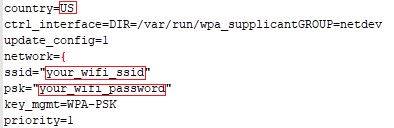
Replace the country code if needed (GB, FR, DE, ES, US, CA etc..).
Replace your_wifi_ssdid with your wifi ssid (ex: ‘’homewifi’’).
Replace your_wifi_password with your wifi password (ex: ‘’1234’’).
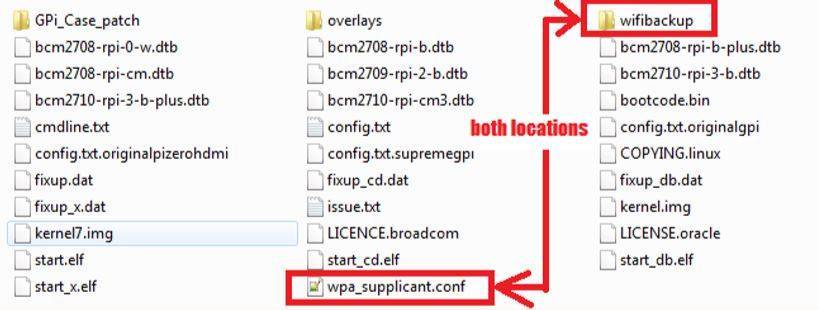
Save and copy it to the root of boot partition on your Micro SD Card (the only partition you see on PC after burning the image file).
Copy it on wifibackup folder too for an easy re enable by script.
Insert the Micro SD Card back into the Retroflag GPi case and it is now ready to use.
Latest from the blog
Visit the blog EPOMAKER Carbon X Review – 46 g Carbon-Fibre 8K Wireless Mouse for Competitive FPS
2 November 2026
EPOMAKER Carbon X Review – 46 g Carbon-Fibre 8K Wireless Mouse for Competitive FPS
2 November 2026
 GPD WIN Mini Ultra – A Bigger 8-inch 120Hz Screen, Intel Arc G3 Extreme and Dual USB4 v2.0
27 October 2026
GPD WIN Mini Ultra – A Bigger 8-inch 120Hz Screen, Intel Arc G3 Extreme and Dual USB4 v2.0
27 October 2026
 RockTek PJ500 Ultra Review – A 1080p Home Cinema Projector for Streaming and Gaming
27 October 2026
RockTek PJ500 Ultra Review – A 1080p Home Cinema Projector for Streaming and Gaming
27 October 2026
 EPOMAKER RT75 and TH26 Review – Retro 75% Keyboard with Detachable Screen and 5-Key Macro Numpad
26 October 2026
EPOMAKER RT75 and TH26 Review – Retro 75% Keyboard with Detachable Screen and 5-Key Macro Numpad
26 October 2026
Questions & answers